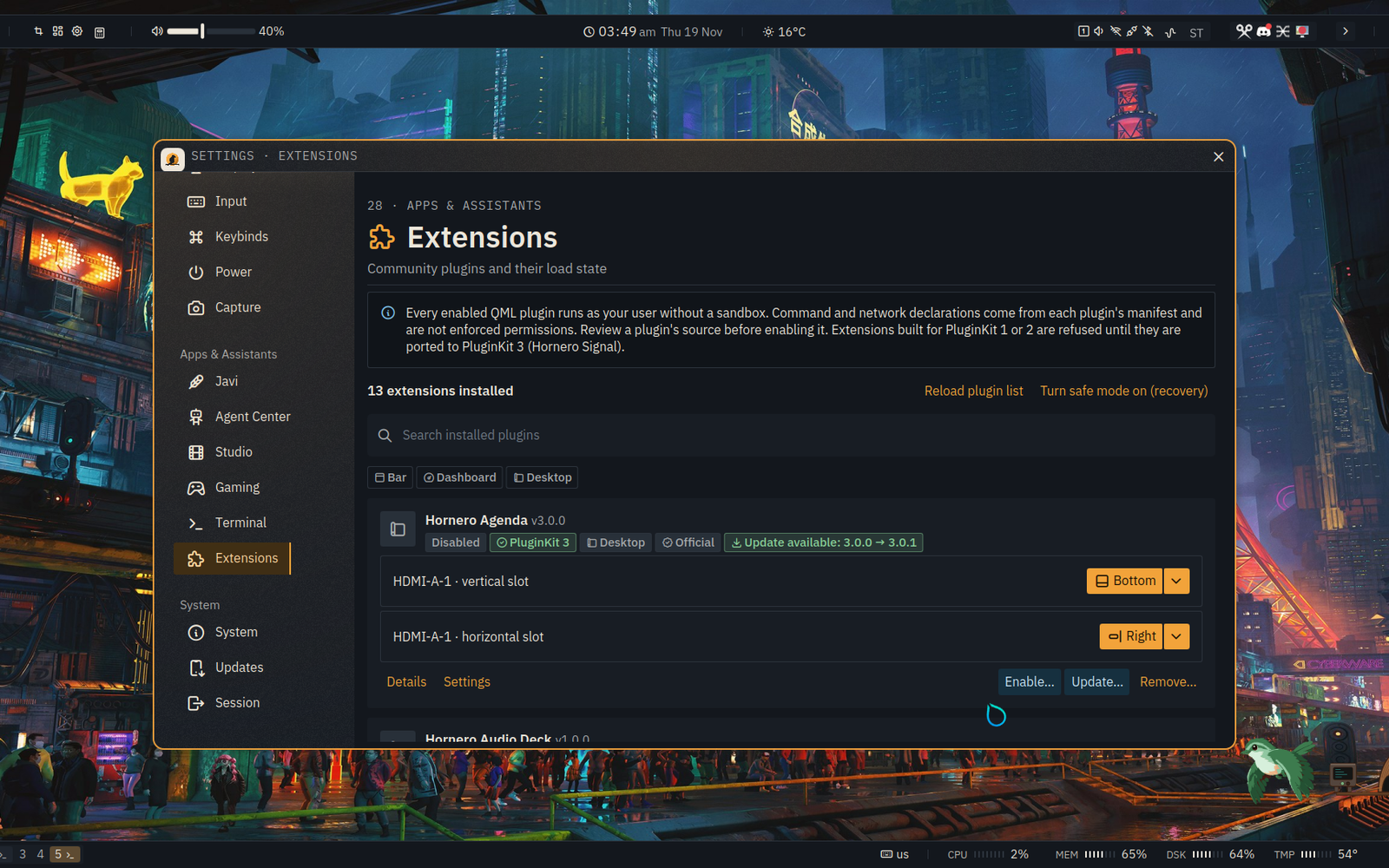
First-party extensions for Hornero Shell, published in HorneroOS/plugins. Control Center and horneroctl install them as inert package data. Enabling one is a separate step.
Plugin QML runs in-process inside Hornero Shell, with your user permissions: there is no sandbox. The commands, network hosts and settings below are what each plugin declares; nothing enforces them. Read the pinned source before enabling one. The Shell asks you to confirm.
An extension with a dashboard placement gets a card in the Dashboard’s Extensions tab, next to Media, Performance, Weather and Workspaces. A bar extension sits in the bar and a desktop extension lives on the desktop. A manifest may also declare extra surfaces, such as the launcher; each card names them exactly as declared.
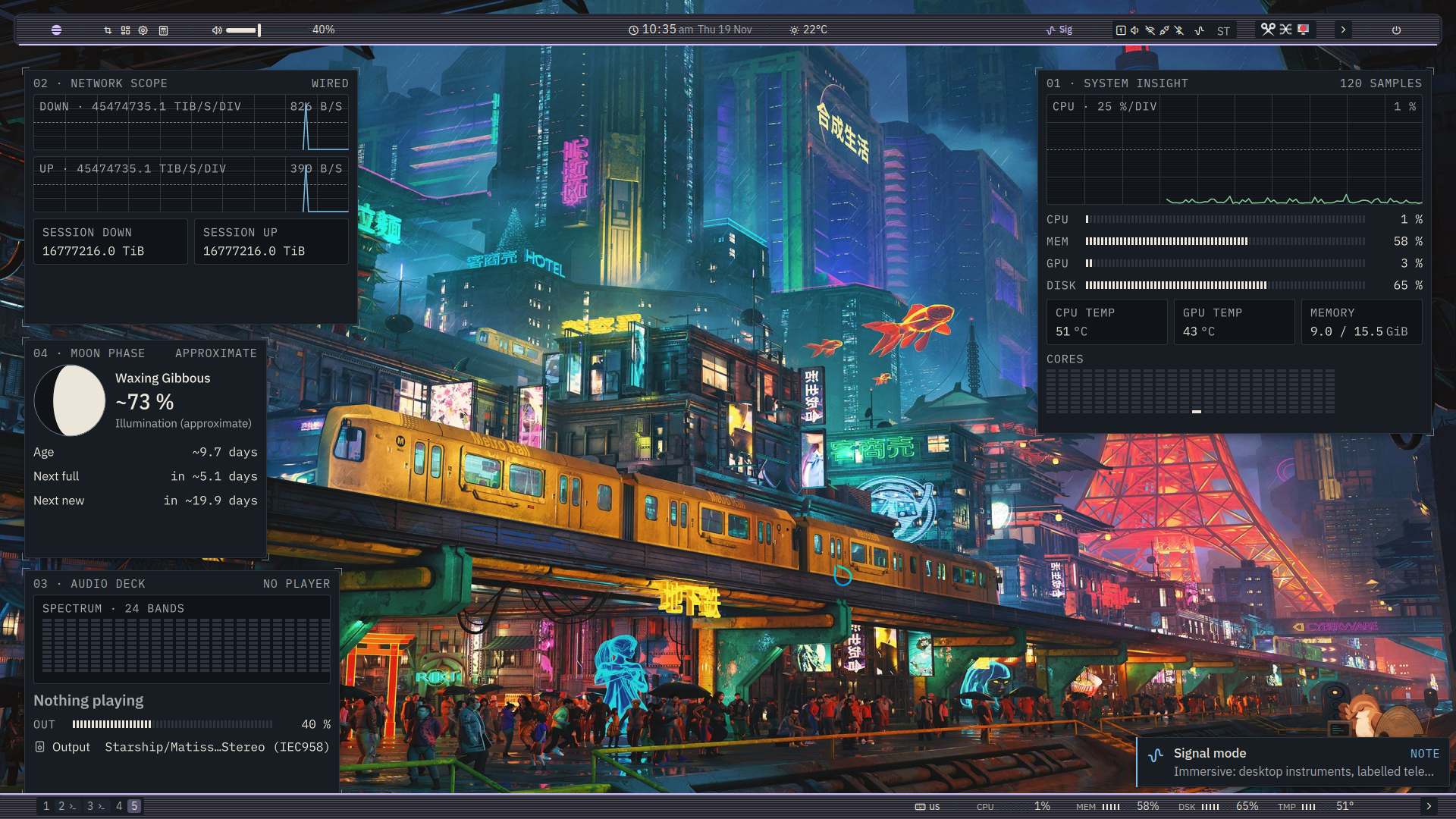
Real capture · Hornero SignalExtensions living on the desktop (sample data)
Official catalogue, 30 packages
Each card shows where the extension appears and what it declares. Each card carries an in-house initials badge, not an official extension icon. Open one for its checksum, source and install command. There are no screenshots of these extensions yet, so the schematics show placement only.
30 official extensions
HA
officialhornero-agenda
Hornero Agenda
desktop
v3.0.2utilitiesofficial
A desktop widget of date facts (day, ISO week, quarter, day of year, days remaining) with a year partition bar, from the shared time provider. Dates only; no events source.
Recommended install: open Control Center → Extensions, find Hornero Agenda, review its declared capabilities and install it; enabling is a separate step with its own consent. Installing only copies inert package data.
Terminal alternative:
horneroctl plugin catalog install hornero-agenda --revision aa8280f57b8944abcae95a33ac9e45505b1f9fa8 --yesRequires horneroctl at this revision or later; Preview29 does not support --revision.
HA
officialhornero-ai-usage
Hornero AI Usage
dashboard
v3.0.1utilitiesofficial
Bar indicator, provider switcher popover and dashboard card over the normalized horneroctl agent usage records. Quota is shown only when a provider record carries it; otherwise it is unknown.
Recommended install: open Control Center → Extensions, find Hornero AI Usage, review its declared capabilities and install it; enabling is a separate step with its own consent. Installing only copies inert package data.
Terminal alternative:
horneroctl plugin catalog install hornero-ai-usage --revision aa8280f57b8944abcae95a33ac9e45505b1f9fa8 --yesRequires horneroctl at this revision or later; Preview29 does not support --revision.
HA
officialhornero-audio-deck
Hornero Audio Deck
desktop
v1.1.0mediaofficial
Audio Deck: a desktop instrument over the shared media, audio and spectrum providers: the real PipeWire spectrum as VU strips, the current track and the output volume. Real data only.
showSpectrum · boolean, default true — Show the spectrum. It holds the shared `spectrum` lease, which runs the PipeWire visualiser only while this is on and the widget is loaded.
showArtist · boolean, default true — Show the artist and album line of the current track.
bandCount · integer, default 24 · 4–24 — Spectrum bands drawn. Fewer bands average neighbouring bands of the real PipeWire spectrum; it never draws more than the provider reports.
Recommended install: open Control Center → Extensions, find Hornero Audio Deck, review its declared capabilities and install it; enabling is a separate step with its own consent. Installing only copies inert package data.
Terminal alternative:
horneroctl plugin catalog install hornero-audio-deck --revision aa8280f57b8944abcae95a33ac9e45505b1f9fa8 --yesRequires horneroctl at this revision or later; Preview29 does not support --revision.
HB
officialhornero-battery
Hornero Battery
bar
v3.0.1utilitiesofficial
Contextual bar indicator with a Hornero Glyph and a popover/dashboard module showing charge, time left, rate, health and power profile from the shared power provider. Read-only.
showWhenNoBattery · boolean, default false — Keep a permanent 'No battery' bar item when Power reports no battery (the 1.x behaviour). Off, the 2.0 default, takes no bar space on desktops.
showPercentage · boolean, default true — Show the battery percentage in the bar indicator (the 1.x behaviour).
showStateText · boolean, default true — Append the Power state (charging, fully-charged, discharging, pending-charge) when known (the 1.x behaviour).
lowBatteryPercent · integer, default 20 · 5–50 — Charge percent at or below which, while on battery, a low-battery chip is shown. Adds a chip only; 1.x had no threshold.
Recommended install: open Control Center → Extensions, find Hornero Battery, review its declared capabilities and install it; enabling is a separate step with its own consent. Installing only copies inert package data.
Terminal alternative:
horneroctl plugin catalog install hornero-battery --revision aa8280f57b8944abcae95a33ac9e45505b1f9fa8 --yesRequires horneroctl at this revision or later; Preview29 does not support --revision.
HC
officialhornero-calendar
Hornero Calendar
desktop
v3.1.1utilitiesofficial
A desktop widget with a display clock, the full date and a square-celled month grid over the shared time provider. Dates only; no events source.
Recommended install: open Control Center → Extensions, find Hornero Calendar, review its declared capabilities and install it; enabling is a separate step with its own consent. Installing only copies inert package data.
Terminal alternative:
horneroctl plugin catalog install hornero-calendar --revision aa8280f57b8944abcae95a33ac9e45505b1f9fa8 --yesRequires horneroctl at this revision or later; Preview29 does not support --revision.
HC
officialhornero-clipboard
Hornero Clipboard
dashboard
v1.0.0utilitiesofficial
Private clipboard history for the launcher (>clipboard): text only, kept in memory and never written to disk, skips password-manager secrets, with retention, size and excluded-word limits you control. Pause, resume and clear are commands.
Recommended install: open Control Center → Extensions, find Hornero Clipboard, review its declared capabilities and install it; enabling is a separate step with its own consent. Installing only copies inert package data.
Terminal alternative:
horneroctl plugin catalog install hornero-clipboard --revision aa8280f57b8944abcae95a33ac9e45505b1f9fa8 --yesRequires horneroctl at this revision or later; Preview29 does not support --revision.
HC
officialhornero-containers
Hornero Containers
dashboard
v1.0.0utilitiesofficial
A read-only roster of your Podman and Docker containers: state, image, uptime and published ports. Never starts, stops or pulls anything. Says so plainly when no runtime answers.
Recommended install: open Control Center → Extensions, find Hornero Containers, review its declared capabilities and install it; enabling is a separate step with its own consent. Installing only copies inert package data.
Terminal alternative:
horneroctl plugin catalog install hornero-containers --revision aa8280f57b8944abcae95a33ac9e45505b1f9fa8 --yesRequires horneroctl at this revision or later; Preview29 does not support --revision.
HC
officialhornero-countdown
Hornero Countdown
bar
v3.1.1utilitiesofficial
Bar timers: a countdown with 5/10/25 minute presets and a stopwatch behind one indicator, deadline and anchor based so sleep never loses time.
defaultMinutes · integer, default 5 · 1–180 — Countdown length in minutes used until a preset is chosen.
deadlineEpochMs · integer, default 0 · 0–… — Saved running deadline in epoch milliseconds (0 when not running). Managed by the timer; do not edit.
totalSeconds · integer, default 0 · 0–10800 — Saved countdown length in seconds (0 means the default length). Managed by the timer; do not edit.
remainingSeconds · integer, default 0 · 0–10800 — Saved paused time remaining in seconds (0 means a full countdown). Managed by the timer; do not edit.
accumulatedMs · integer, default 0 · 0–… — Saved elapsed milliseconds while paused. Managed by the stopwatch; do not edit.
startedEpochMs · integer, default 0 · 0–… — Saved start anchor in epoch milliseconds (0 when paused). Managed by the stopwatch; do not edit.
showTenths · boolean, default true — Show tenths of a second in the elapsed time.
defaultMode · enum, default countdown · options: countdown, stopwatch — What the popover shows first.
Recommended install: open Control Center → Extensions, find Hornero Countdown, review its declared capabilities and install it; enabling is a separate step with its own consent. Installing only copies inert package data.
Terminal alternative:
horneroctl plugin catalog install hornero-countdown --revision aa8280f57b8944abcae95a33ac9e45505b1f9fa8 --yesRequires horneroctl at this revision or later; Preview29 does not support --revision.
HD
officialhornero-device-battery
Hornero Device Battery
dashboard
v1.0.0utilitiesofficial
Charge of the wireless things on your desk: game controllers, mice, keyboards, headsets, pens and phones, from UPower. Honest about devices that report no percentage.
Recommended install: open Control Center → Extensions, find Hornero Device Battery, review its declared capabilities and install it; enabling is a separate step with its own consent. Installing only copies inert package data.
Terminal alternative:
horneroctl plugin catalog install hornero-device-battery --revision aa8280f57b8944abcae95a33ac9e45505b1f9fa8 --yesRequires horneroctl at this revision or later; Preview29 does not support --revision.
HD
officialhornero-disk-usage
Hornero Disk Usage
dashboard
v3.0.2utilitiesofficial
Every physical disk as a partition bar with a dimension line, free space and a near-full flag from the shared system provider. Read-only.
Recommended install: open Control Center → Extensions, find Hornero Disk Usage, review its declared capabilities and install it; enabling is a separate step with its own consent. Installing only copies inert package data.
Terminal alternative:
horneroctl plugin catalog install hornero-disk-usage --revision aa8280f57b8944abcae95a33ac9e45505b1f9fa8 --yesRequires horneroctl at this revision or later; Preview29 does not support --revision.
HE
officialhornero-emoji
Hornero Emoji
dashboard
v1.0.0utilitiesofficial
Emoji search in the launcher (>emoji) and an emoji picker card over the bundled Unicode 16.0 table. Local only: no history, no network, your skin tone and result count are settings.
skinTone · enum, default default · options: default, light, medium-light, medium, medium-dark, dark — Skin tone applied to emoji that have tone variants (people, hands).
maxResults · integer, default 12 · 6–24 — How many emoji the launcher and the card list at most.
showGroup · boolean, default true — Show the emoji group (for example Animals & nature) next to the name.
Recommended install: open Control Center → Extensions, find Hornero Emoji, review its declared capabilities and install it; enabling is a separate step with its own consent. Installing only copies inert package data.
Terminal alternative:
horneroctl plugin catalog install hornero-emoji --revision aa8280f57b8944abcae95a33ac9e45505b1f9fa8 --yesRequires horneroctl at this revision or later; Preview29 does not support --revision.
HE
officialhornero-equalizer
Hornero Equalizer
bar
v1.0.0utilitiesofficial
A live spectrum analyser for the bar and its popover over the shell's real PipeWire spectrum. Honest by design: an analyser, not a sound filter; it draws nothing while nothing plays and holds the analyser only while a player is playing.
barBands · integer, default 8 · 4–12 — How many bands the bar indicator draws.
popoverBands · integer, default 16 · 8–24 — How many bands the popover analyser draws.
peakHold · boolean, default true — Draw a peak tick above each popover band, derived from recent real samples.
analyseWhen · enum, default playing · options: playing, always — playing runs the shared analyser only while a media player plays; always also covers apps without a player.
whenSilent · enum, default glyph · options: glyph, hide — glyph keeps the indicator button while silent; hide removes it until sound plays.
Recommended install: open Control Center → Extensions, find Hornero Equalizer, review its declared capabilities and install it; enabling is a separate step with its own consent. Installing only copies inert package data.
Terminal alternative:
horneroctl plugin catalog install hornero-equalizer --revision aa8280f57b8944abcae95a33ac9e45505b1f9fa8 --yesRequires horneroctl at this revision or later; Preview29 does not support --revision.
HF
officialhornero-forge-board
Hornero Forge Board
dashboard
v1.0.1utilitiesofficial
CI and pull-request status for the GitHub repositories you name, through the gh CLI session you already signed in. Read-only; stores and sees no token.
Recommended install: open Control Center → Extensions, find Hornero Forge Board, review its declared capabilities and install it; enabling is a separate step with its own consent. Installing only copies inert package data.
Terminal alternative:
horneroctl plugin catalog install hornero-forge-board --revision aa8280f57b8944abcae95a33ac9e45505b1f9fa8 --yesRequires horneroctl at this revision or later; Preview29 does not support --revision.
HG
officialhornero-git-board
Hornero Git Board
dashboard
v1.0.0utilitiesofficial
A read-only status board for the repositories you name: branch, ahead/behind, staged, changed, untracked and conflicted counts and the last commit. Local git only, no network, never writes.
Recommended install: open Control Center → Extensions, find Hornero Git Board, review its declared capabilities and install it; enabling is a separate step with its own consent. Installing only copies inert package data.
Terminal alternative:
horneroctl plugin catalog install hornero-git-board --revision aa8280f57b8944abcae95a33ac9e45505b1f9fa8 --yesRequires horneroctl at this revision or later; Preview29 does not support --revision.
HM
officialhornero-metronome
Hornero Metronome
bar
v3.0.1utilitiesofficial
Compact bar metronome with a popover (BPM slider plus minus/plus), deadline-scheduled beats that skip missed beats after sleep, and optional first-beat accent. No processes, no network.
Recommended install: open Control Center → Extensions, find Hornero Metronome, review its declared capabilities and install it; enabling is a separate step with its own consent. Installing only copies inert package data.
Terminal alternative:
horneroctl plugin catalog install hornero-metronome --revision aa8280f57b8944abcae95a33ac9e45505b1f9fa8 --yesRequires horneroctl at this revision or later; Preview29 does not support --revision.
HM
officialhornero-microphone
Hornero Microphone
bar
v3.0.3utilitiesofficial
Compact bar indicator, details popover and dashboard card for microphone state over the shared PluginKit Audio facade, with honest muted and no-input-device states. Never records audio.
Recommended install: open Control Center → Extensions, find Hornero Microphone, review its declared capabilities and install it; enabling is a separate step with its own consent. Installing only copies inert package data.
Terminal alternative:
horneroctl plugin catalog install hornero-microphone --revision aa8280f57b8944abcae95a33ac9e45505b1f9fa8 --yesRequires horneroctl at this revision or later; Preview29 does not support --revision.
HM
officialhornero-moon-phase
Hornero Moon Phase
desktop
v3.1.0utilitiesofficial
Moon Phase: desktop widget and bar indicator for the approximate moon phase and illumination from the 1.x synodic approximation, plus Desktop Widgets 2.0 size classes, per-display slot display and hide-with-restore. Always labelled approximate.
showIllumination · boolean, default true — Show the approximate illumination percentage (the 1.x behaviour).
showAge · boolean, default true — Show the approximate moon age in days (the 1.x behaviour).
showNextPhases · boolean, default true — Show approximate days to the next new and full moons, derived from the same synodic approximation.
dataDensity · enum, default standard · options: compact, standard, detailed — compact shows only the phase name; standard keeps the 1.x rows; detailed adds the approximation note.
hemisphere · enum, default north · options: north, south — Where you observe from. The waxing moon is lit on the right in the northern hemisphere and on the left in the southern one.
Recommended install: open Control Center → Extensions, find Hornero Moon Phase, review its declared capabilities and install it; enabling is a separate step with its own consent. Installing only copies inert package data.
Terminal alternative:
horneroctl plugin catalog install hornero-moon-phase --revision aa8280f57b8944abcae95a33ac9e45505b1f9fa8 --yesRequires horneroctl at this revision or later; Preview29 does not support --revision.
HN
officialhornero-network-scope
Hornero Network Scope
desktop
v1.1.0systemofficial
Network Scope: a desktop instrument over the shared network provider: download and upload oscilloscopes with stated scales, current rates, Wi-Fi signal and session totals. Real telemetry only.
showSessionTotals · boolean, default true — Show the downloaded/uploaded totals since the shell started.
showNetworkName · boolean, default false — Show the Wi-Fi network name (personal data; off by default on an always-visible desktop widget).
scale · enum, default auto · options: auto, 1 MiB/s, 10 MiB/s, 100 MiB/s — Vertical scale of both traces. auto follows the recent peak; a fixed scale makes traces comparable over time (samples above it are clipped at the top).
Recommended install: open Control Center → Extensions, find Hornero Network Scope, review its declared capabilities and install it; enabling is a separate step with its own consent. Installing only copies inert package data.
Terminal alternative:
horneroctl plugin catalog install hornero-network-scope --revision aa8280f57b8944abcae95a33ac9e45505b1f9fa8 --yesRequires horneroctl at this revision or later; Preview29 does not support --revision.
HN
officialhornero-now-playing
Hornero Now Playing
bar
v3.0.2utilitiesofficial
Compact bar indicator, details popover and dashboard card over the shared PluginKit Media (MPRIS) facade, with graceful no-player and idle-player states.
Recommended install: open Control Center → Extensions, find Hornero Now Playing, review its declared capabilities and install it; enabling is a separate step with its own consent. Installing only copies inert package data.
Terminal alternative:
horneroctl plugin catalog install hornero-now-playing --revision aa8280f57b8944abcae95a33ac9e45505b1f9fa8 --yesRequires horneroctl at this revision or later; Preview29 does not support --revision.
HP
officialhornero-pomodoro
Hornero Pomodoro
bar
v4.0.0productivityofficial
Pomodoro: a bar focus timer with short and long breaks, deadline-correct timing across sleep and reload, and an optional hook that switches the shell to the Focus experience while you focus and puts your mode back afterwards.
shortBreakMinutes · integer, default 5 · 1–60 — Short break length in minutes.
longBreakMinutes · integer, default 15 · 1–120 — Long break length in minutes, after a full set of focus sessions.
cyclesBeforeLongBreak · integer, default 4 · 2–8 — Focus sessions in a set before the long break.
autoStartNext · boolean, default false — Start the next phase by itself instead of waiting for you.
experienceHook · enum, default off · options: off, focus — Focus: switch the shell to the Focus experience during focus phases and restore your mode after. Needs horneroctl.
deadlineEpochMs · integer, default 0 · 0–… — Saved running deadline in epoch milliseconds (0 when not running). Managed by the timer; do not edit.
remainingSeconds · integer, default 0 · 0–10800 — Saved paused time remaining in seconds (0 means a full session). Managed by the timer; do not edit.
phase · enum, default focus · options: focus, short, long — Saved current phase. Managed by the timer; do not edit.
setCount · integer, default 0 · 0–8 — Saved focus sessions finished in this set. Managed by the timer; do not edit.
Recommended install: open Control Center → Extensions, find Hornero Pomodoro, review its declared capabilities and install it; enabling is a separate step with its own consent. Installing only copies inert package data.
Terminal alternative:
horneroctl plugin catalog install hornero-pomodoro --revision aa8280f57b8944abcae95a33ac9e45505b1f9fa8 --yesRequires horneroctl at this revision or later; Preview29 does not support --revision.
HP
officialhornero-port-watch
Hornero Port Watch
dashboard
v1.0.0utilitiesofficial
What is listening on this machine, and what is free: ports, protocol, how far each bind reaches and the owning process when the kernel lets you see it. Watch the ports your projects need. Read-only, local.
protocols · enum, default tcp · options: tcp, udp, both — Which protocols to list. UDP has no listen state, so bound UDP sockets are shown.
scope · enum, default all · options: all, exposed, local — All shows everything; exposed only binds on every interface; local only binds reachable from this machine.
watchedPorts · string, default — Ports to keep on the board even when free, separated by commas or spaces, for example 3000, 5173, 8080.
maxRows · integer, default 10 · 3–30 — Most rows to show; watched ports come first, then ascending port.
refreshSeconds · integer, default 10 · 2–120 — Seconds between socket table reads. Reading pauses in the Gaming experience.
showProcess · boolean, default true — Show the owning process name and pid where the kernel exposes them to your user.
Recommended install: open Control Center → Extensions, find Hornero Port Watch, review its declared capabilities and install it; enabling is a separate step with its own consent. Installing only copies inert package data.
Terminal alternative:
horneroctl plugin catalog install hornero-port-watch --revision aa8280f57b8944abcae95a33ac9e45505b1f9fa8 --yesRequires horneroctl at this revision or later; Preview29 does not support --revision.
HQ
officialhornero-quick-notes
Hornero Quick Notes
dashboard
v3.0.2utilitiesofficial
Dashboard card with one persistent note saved through PluginKit Settings. Debounced autosave, Ctrl+S, flush on unload, clear confirmation, no processes or network.
note · string, default — Persistent quick note text (max 4096 characters). Same key as 1.x; existing notes are kept.
autoSaveDelayMs · integer, default 600 · 200–5000 — Debounce before an edit is saved automatically (600 ms in 1.x). Ctrl+S and unload always save immediately.
showCounts · boolean, default true — Show the character/word count line (shown in 1.x).
Recommended install: open Control Center → Extensions, find Hornero Quick Notes, review its declared capabilities and install it; enabling is a separate step with its own consent. Installing only copies inert package data.
Terminal alternative:
horneroctl plugin catalog install hornero-quick-notes --revision aa8280f57b8944abcae95a33ac9e45505b1f9fa8 --yesRequires horneroctl at this revision or later; Preview29 does not support --revision.
HS
officialhornero-studio-audio
Hornero Studio Audio
bar
v3.0.2utilitiesofficial
Bar indicator, popover and dashboard card for the Studio audio mode and Temporary Performance state from the typed horneroctl contract. Read-only; mode changes stay in the CLI and Control Center.
Recommended install: open Control Center → Extensions, find Hornero Studio Audio, review its declared capabilities and install it; enabling is a separate step with its own consent. Installing only copies inert package data.
Terminal alternative:
horneroctl plugin catalog install hornero-studio-audio --revision aa8280f57b8944abcae95a33ac9e45505b1f9fa8 --yesRequires horneroctl at this revision or later; Preview29 does not support --revision.
HS
officialhornero-studio-jobs
Hornero Studio Jobs
dashboard
v2.1.0utilitiesofficial
Render and export job monitor for HorneroOS Studio: shows queued, running, finished and interrupted jobs from the typed horneroctl studio jobs contract. Read-only; jobs are submitted and cancelled from the CLI or Control Center.
Recommended install: open Control Center → Extensions, find Hornero Studio Jobs, review its declared capabilities and install it; enabling is a separate step with its own consent. Installing only copies inert package data.
Terminal alternative:
horneroctl plugin catalog install hornero-studio-jobs --revision aa8280f57b8944abcae95a33ac9e45505b1f9fa8 --yesRequires horneroctl at this revision or later; Preview29 does not support --revision.
HS
officialhornero-system-insight
Hornero System Insight
desktop
v1.1.1systemofficial
System Insight: a desktop instrument over the shared system provider: a CPU oscilloscope from the shared Telemetry history, segmented meters, per-core load strips and temperatures. Real telemetry only.
showCores · boolean, default true — Show one vertical load strip per logical CPU when the widget is tall enough.
showTemperatures · boolean, default true — Show CPU/GPU temperatures and memory use when the system provider reports them.
warnPercent · integer, default 85 · 50–100 — Usage percent at or above which a meter segment turns signal (the visual language default is 85).
showGpu · boolean, default true — Show the GPU meter (it already reads as unavailable when the system provider has no GPU data).
showDisk · boolean, default true — Show the disk usage meter.
temperatureUnit · enum, default celsius · options: celsius, fahrenheit — Unit for the CPU and GPU temperatures. The provider reports Celsius; Fahrenheit is a display conversion.
Recommended install: open Control Center → Extensions, find Hornero System Insight, review its declared capabilities and install it; enabling is a separate step with its own consent. Installing only copies inert package data.
Terminal alternative:
horneroctl plugin catalog install hornero-system-insight --revision aa8280f57b8944abcae95a33ac9e45505b1f9fa8 --yesRequires horneroctl at this revision or later; Preview29 does not support --revision.
HT
officialhornero-toolbox
Hornero Toolbox
dashboard
v1.0.0utilitiesofficial
Seven everyday tools in one Signal card: calculator, unit converter (with data sizes), base converter, colour with WCAG contrast, date maths, JSON format/minify and text transforms. Local arithmetic only.
Recommended install: open Control Center → Extensions, find Hornero Toolbox, review its declared capabilities and install it; enabling is a separate step with its own consent. Installing only copies inert package data.
Terminal alternative:
horneroctl plugin catalog install hornero-toolbox --revision aa8280f57b8944abcae95a33ac9e45505b1f9fa8 --yesRequires horneroctl at this revision or later; Preview29 does not support --revision.
HU
officialhornero-uptime
Hornero Uptime
bar
v3.0.2utilitiesofficial
Bar indicator plus popover/dashboard session detail (uptime, boot time, idle time) from /proc/uptime with the declared cat command. No PluginKit uptime facade exists; error state instead of a fabricated zero.
refreshSeconds · integer, default 60 · 15–600 — Seconds between /proc/uptime reads (the 1.x fixed 60-second cadence by default).
showLabel · boolean, default true — Prefix the bar value with 'Up' (the 1.x behaviour); off shows the duration alone.
showWhenUnavailable · boolean, default true — Keep the bar indicator visible, labelled unavailable, when /proc/uptime cannot be read (the 1.x behaviour); off hides it until a read succeeds.
Recommended install: open Control Center → Extensions, find Hornero Uptime, review its declared capabilities and install it; enabling is a separate step with its own consent. Installing only copies inert package data.
Terminal alternative:
horneroctl plugin catalog install hornero-uptime --revision aa8280f57b8944abcae95a33ac9e45505b1f9fa8 --yesRequires horneroctl at this revision or later; Preview29 does not support --revision.
HV
officialhornero-volume
Hornero Volume
bar
v3.0.3utilitiesofficial
Compact bar indicator, details popover and dashboard card for output volume over the shared PluginKit Audio facade, with honest muted and no-output-device states.
Recommended install: open Control Center → Extensions, find Hornero Volume, review its declared capabilities and install it; enabling is a separate step with its own consent. Installing only copies inert package data.
Terminal alternative:
horneroctl plugin catalog install hornero-volume --revision aa8280f57b8944abcae95a33ac9e45505b1f9fa8 --yesRequires horneroctl at this revision or later; Preview29 does not support --revision.
HW
officialhornero-weather
Hornero Weather
dashboard
v3.1.1utilitiesofficial
Dashboard card and contextual bar indicator complementing native Weather with configurable density, a local wind-threshold alert and forecast detail from the PluginKit Weather facade only
forecastDays · integer, default 3 · 0–7 — Forecast entries to show (the 1.x card showed the first 3).
showHumidity · boolean, default true — Show relative humidity when the Weather facade reports it (the 1.x behaviour).
showWind · boolean, default true — Show wind speed in km/h when the Weather facade reports it (the 1.x behaviour).
showSunTimes · boolean, default true — Show sunrise and sunset times from the Weather facade (the 1.x behaviour).
dataDensity · enum, default standard · options: compact, standard, detailed — compact shows only temperature and description; standard keeps the 1.x rows; detailed adds the derived forecast range.
windAlertKmh · integer, default 50 · 1–200 — Local high-wind alert threshold in km/h. Not an official alert; 1.x had no threshold.
showSunProgress · boolean, default true — Dashboard: show day length, the next sun event and daylight progress (derived from today's sunrise and sunset).
barIndicator · enum, default temperature · options: temperature, sun — What the bar indicator shows: the temperature, or sunrise and sunset times.
Recommended install: open Control Center → Extensions, find Hornero Weather, review its declared capabilities and install it; enabling is a separate step with its own consent. Installing only copies inert package data.
Terminal alternative:
horneroctl plugin catalog install hornero-weather --revision aa8280f57b8944abcae95a33ac9e45505b1f9fa8 --yesRequires horneroctl at this revision or later; Preview29 does not support --revision.
HW
officialhornero-world-clock
Hornero World Clock
dashboard
v3.2.1utilitiesofficial
Dashboard card with local, UTC and three selectable cities. Pure-JS rule-based offsets (fixed, EU, US and southern DST rules) labelled per row; no processes or network.
city1 · enum, default buenos-aires · options: utc, buenos-aires, new-york, chicago, los-angeles, london, madrid, berlin, new-delhi, tokyo, sydney, auckland — First city row. Only zones with a built-in DST rule are offered.
city2 · enum, default madrid · options: utc, buenos-aires, new-york, chicago, los-angeles, london, madrid, berlin, new-delhi, tokyo, sydney, auckland — Second city row. Only zones with a built-in DST rule are offered.
city3 · enum, default tokyo · options: utc, buenos-aires, new-york, chicago, los-angeles, london, madrid, berlin, new-delhi, tokyo, sydney, auckland — Third city row. Only zones with a built-in DST rule are offered.
showLocal · boolean, default true — Show the local time row (the 1.x behaviour).
showUtc · boolean, default true — Show the UTC row (the 1.x behaviour).
showSeconds · boolean, default true — Show seconds in every row (the 1.x behaviour).
twentyFourHour · boolean, default true — Use 24-hour times (the 1.x behaviour); off shows 12-hour AM/PM.
barZone · enum, default utc · options: utc, buenos-aires, new-york, chicago, los-angeles, london, madrid, berlin, new-delhi, tokyo, sydney, auckland — Bar indicator: the second time zone shown under your local time.
barShowSeconds · boolean, default false — Bar indicator: show seconds in the local and second-zone times.
Recommended install: open Control Center → Extensions, find Hornero World Clock, review its declared capabilities and install it; enabling is a separate step with its own consent. Installing only copies inert package data.
Terminal alternative:
horneroctl plugin catalog install hornero-world-clock --revision aa8280f57b8944abcae95a33ac9e45505b1f9fa8 --yesRequires horneroctl at this revision or later; Preview29 does not support --revision.
No extensions match. Try another search or adjust the filters.
Write an extension
The surfaces and compatibility above come from each plugin’s pinned manifest (its marketplace block), exactly as declared: this site has not verified them in a live Shell, and entries without that block are shown as not declared. There are still no per-extension screenshots. Check the pinned Shell contract and the plugin validator before relying on either. Official entries are reviewed and kept in HorneroOS/plugins. There is no public community catalogue yet.