Downloadv0.2.0-preview32x86_64 · 2.7 GB
Download HorneroOS
One x86_64 ISO installs HorneroOS Desktop, the Studio edition with selectable creative specializations, or the Gaming edition. It is the current ISO (0.2.0-preview32, a published artifact name). It passed disposable-VM installation validation (UEFI, unencrypted; LUKS, legacy BIOS and Niri were not run against this ISO, and that remains a concrete limitation) and is published as a signed GitHub pre-release. HorneroOS is used daily, with those limitations declared.
Download the current ISO (2.7 GB)Compare the editions
Also announced on the v0.2.0-preview32 release page. Verify every copy with the SHA-256 checksum and the detached GPG signature:
horneroos-2026.10-preview32-x86_64.isothe current install image (Desktop + Studio + Gaming)SHA-256b8cd0f8604bc69f7d2112fb8bccd97115d32d197e9c92c62e02faf5de6345aecSignatureHorneroOS releases key FCFBEE43925AB5429362278AE59EAB44AA2498DC; verify with the public key in the hornero repository (packaging/keys/hornero-release.pub.asc)
Packages newer than the ISO: 0.2.0-preview36
The ISO above is still v0.2.0-preview32: there is no new ISO. v0.2.0-preview36 (2026-11-20) is an AUR package release that brings Hornero Signal. An install made from the ISO, or an existing one, gets it by updating those packages:
hornero-shell1.3.5-1hornero-config0.4.6-1hornero-greeter1.2.0-1horneroctl-bin0.2.0_preview49-1
Release record · Checklist and evidence · In the release history
Releases so far are compositions: exact shell and config commits tested together. The latest tagged one is 0.2.0-preview32.
From file to desktop, and after
Verify
Before you write the ISO, compare the sha256sum output with the published checksum and verify the signature.
sha256sum horneroos-2026.10-preview32-x86_64.iso gpg --verify horneroos-2026.10-preview32-x86_64.iso.sigInstall
Pick the edition, specializations and compositor. Note the declared limitations (LUKS, legacy BIOS and Niri not validated on this ISO): if your case depends on those, try it first in a virtual machine or on a machine you can reinstall.
Update
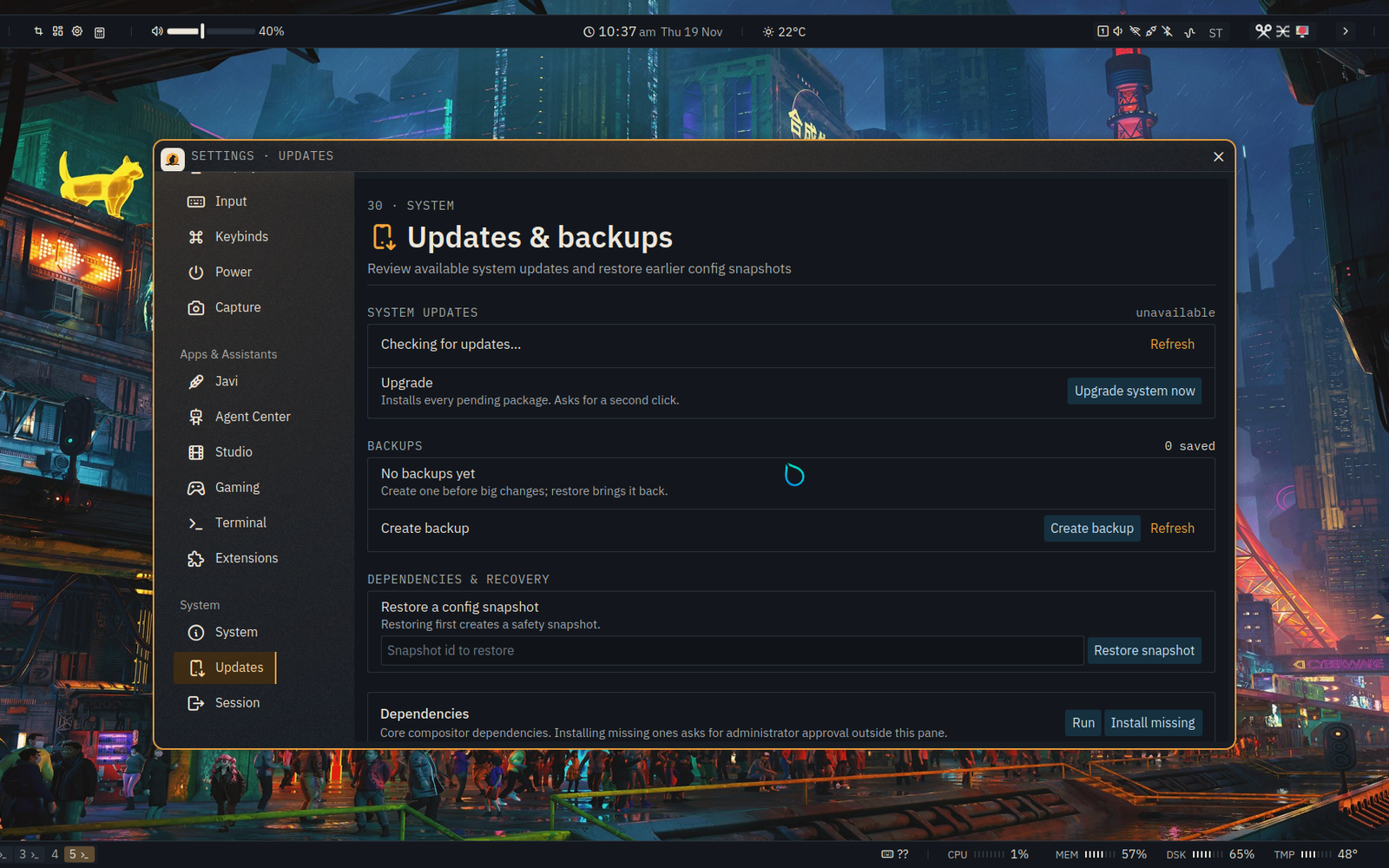
After installing, new work arrives as packages, not as a new ISO. HorneroOS packages come from the AUR, so you update them with an AUR helper such as yay (the ISO does not install one). First save your configuration and see what is pending:
horneroctl config snapshot create --yes
horneroctl package check
yay -Syu
horneroctl package upgrade runs pacman -Syu: it updates the Arch repositories, not AUR packages. No command rolls the system back; the snapshot keeps Hornero configuration only.
Read the updates and rollback guide (OS rollback is still planned)
Official guides: step-by-step installation, first steps after installing and troubleshooting by symptom.
The in-place upgrade to v0.2.0-preview36 is still listed as pending verification in its checklist.
What is not in this ISO yet
The v0.2.0-preview32 ISO is the latest published. What follows is not in that image. What was released as packages arrives by updating (step 03). What is on main arrives with a future release, when the project ledger marks it as released; what is planned does not exist yet.
- ◉Released as packagesHornero Signal
- ◉Released as packagesExperience modes
- ◉Released as packagesHornero Chromatic
- ◉Released as packagesPluginKit 3
- ◉Released as packagesInstrument deck
- ◉Released as packagesApply and undo
- ◉Released as packagesWorkspace needle
- ◉Released as packagesConsole Dashboard
- ◉Released as packagesMedia deck
- ◉Released as packagesJavi Radio
- ◉Released as packagesJavi’s nest
- ◉Released as packagesOriginal Hornero Signal greeter
- ○PlannedFinal Javi and nest art
- ○PlannedSystem rollback
What installing HorneroOS looks like
We do not publish installer captures yet: the steps stay as text until a real Calamares capture exists. What you can see is the day after: updates and rollback.
Where installation stands
- Install image
- v0.2.0-preview32 Current ISO published as a signed pre-release (v0.2.0-preview32), verified in guest and on host; a tampered copy fails checksum and signature verification.
- Installer
- Provisional The Calamares build passed this ISO's VM validation (Desktop, Studio and Gaming, UEFI, unencrypted); LUKS, legacy BIOS and Niri were not run against this ISO. Panda Foss's custom installer remains the future official path.
- Desktop packages
- Available Four AUR packages, for people who already run Arch Linux.
What exists today
Today HorneroOS installs two ways: the signed current ISO above (Desktop, Studio or Gaming), or the Desktop components as Arch User Repository packages on an existing Arch system. The packages are the components of a Wayland-first desktop. Hyprland is the supported compositor and Niri is experimental. Quickshell is the shell runtime, not the operating system itself.
horneroctl-binthe system CLI (native binary)hornero-shellthe Quickshell desktop shell and its layout presetshornero-configthe desktop defaults and theme packshornero-greeterthe SDDM login screen
The greeter package is optional and needs SDDM. The current published package (the landscape greeter) also needs Qt 6 Multimedia; the Signal greeter on the main branch will need Qt 6 Multimedia only for an administrator-chosen video. Other compositors are not supported unless the edition catalogue and acceptance evidence say so.
Edition readiness
Editions share one composition model. The maturity levels reflect what has been tested; they do not mean every edition can be installed.
- HorneroOS DesktopSupported
- HorneroOS ServerPlanned
- HorneroOS AgentsPlanned
- HorneroOS StudioSupported
- HorneroOS GamingSupported
Desktop is the everyday-use base edition. Studio and Gaming install from the same current ISO with selectable specializations and profiles, and passed their VM install validation on this ISO; they are Supported edition. The hornero-qa studio-gate hardware evidence is still pending, so VM results are not physical-hardware proof and Studio is not Supported yet. Server and Agents have composition definitions but no bootable image yet. Niri remains experimental within Desktop. How the editions fit together.
Testing and reports
If something goes wrong on your machine, reports from real hardware are the most useful thing you can send. Include the ISO name, your firmware type, whether the disk is encrypted, and the step where it failed.
The installer
The Calamares build in HorneroOS/installer is a provisional bridge for testing compositions and install flows. Panda Foss is developing the custom HorneroOS installer that is meant to become the official path, and will own it. The Calamares build is not that installer and stays provisional until the custom one is ready to publish and passes acceptance. It uses the edition and compositor contract instead of defining its own package model. The current ISO above already installs Desktop, Studio and Gaming with this Calamares build.
Contributors can follow the HorneroOS design language, which points to the authoritative design sources for the desktop, website, greeter and installer.
To follow tagged compositions, see Releases or the HorneroOS organization on GitHub.