AI Coding & Agents
Agent Toolkit CLI
Ulises Jeremias / Agent Toolkit
V-native capability orchestrator for AI skills, agents, loops, and MCP templates
Hornero Appshorneroctl storex86_64 · Arch + Flatpak + WebApp
Hornero Apps unifies official Arch repositories, Flathub, signed vendor channels, AppImages, isolated Web Apps, and opt-in AUR behind a signed declarative catalog (catalog/apps.v1.json). Shipped in AUR and in the v0.2.0-preview42 QCOW2 (hornero-shell 1.6.0-2, hornero-config 0.6.0-1, horneroctl-bin 0.2.0_preview63-1); the next ISO cut will bundle it alongside Hornero Signal and Hornero Welcome.
Explore catalogWorkstation profilesRead technical guide
Real capturesSignal Night & Signal Day
Real captures from running HorneroOS (1920×1080), shown in blue-hour dark (Signal Night) and white ceramic (Signal Day).
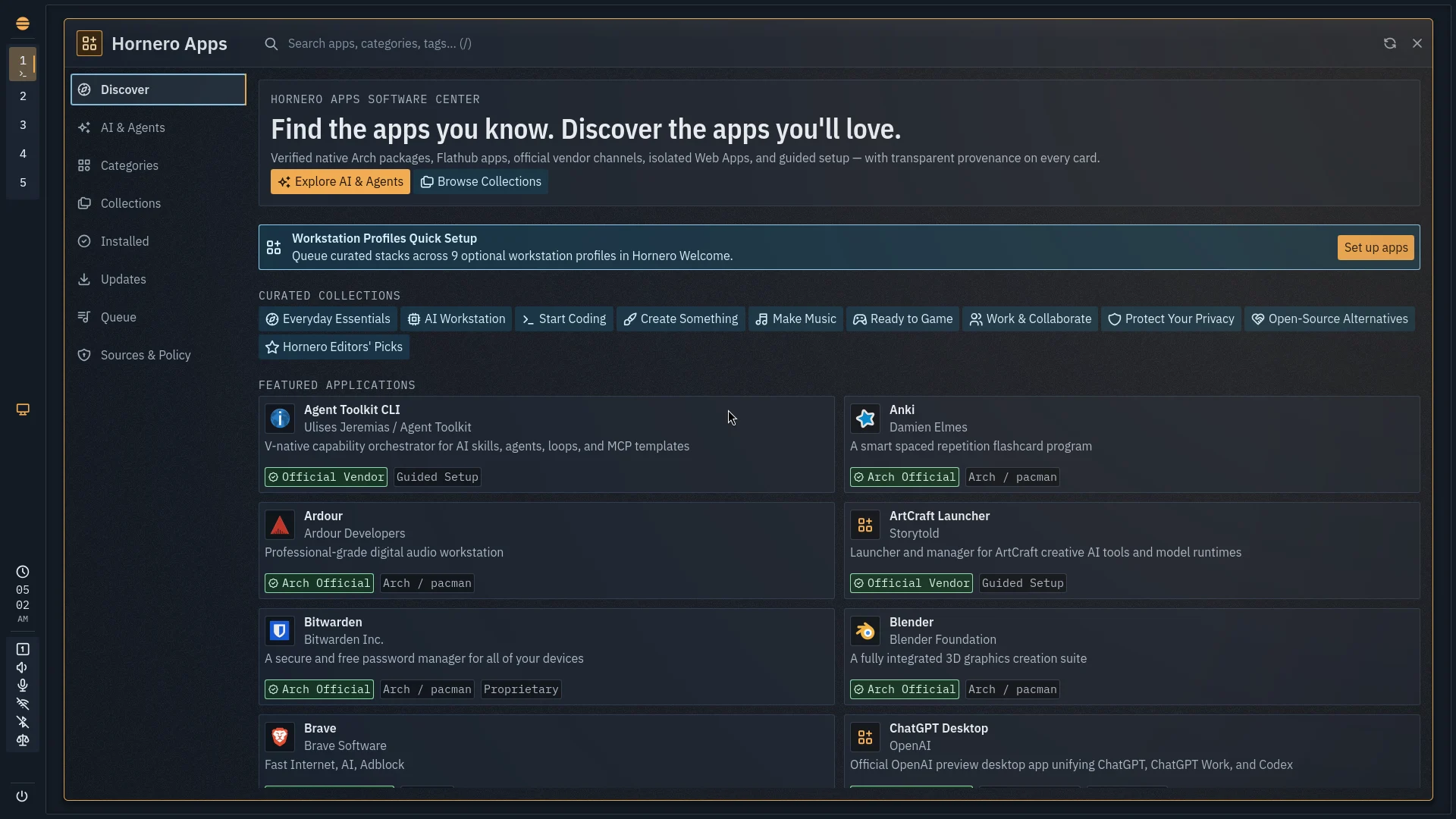
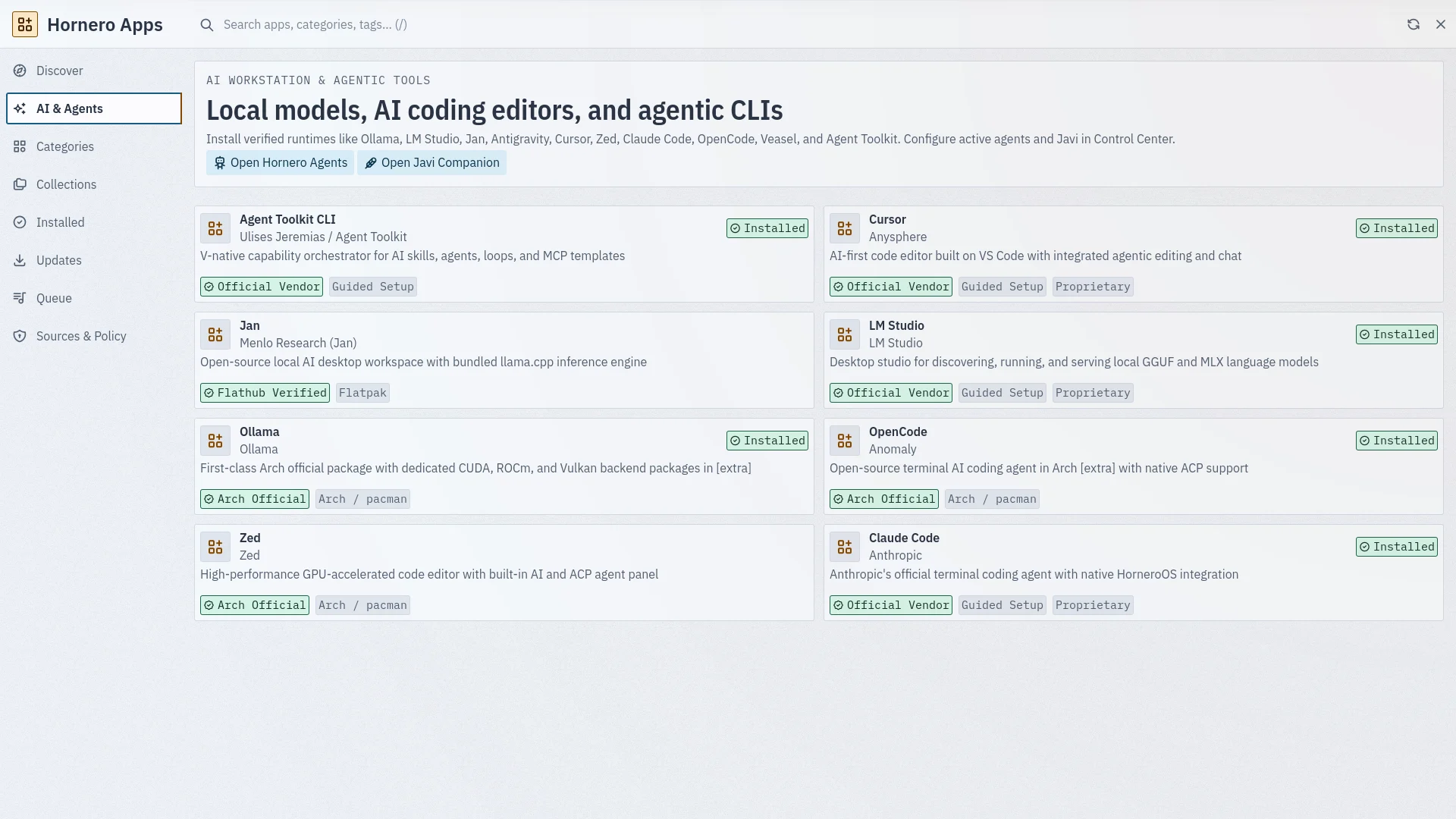
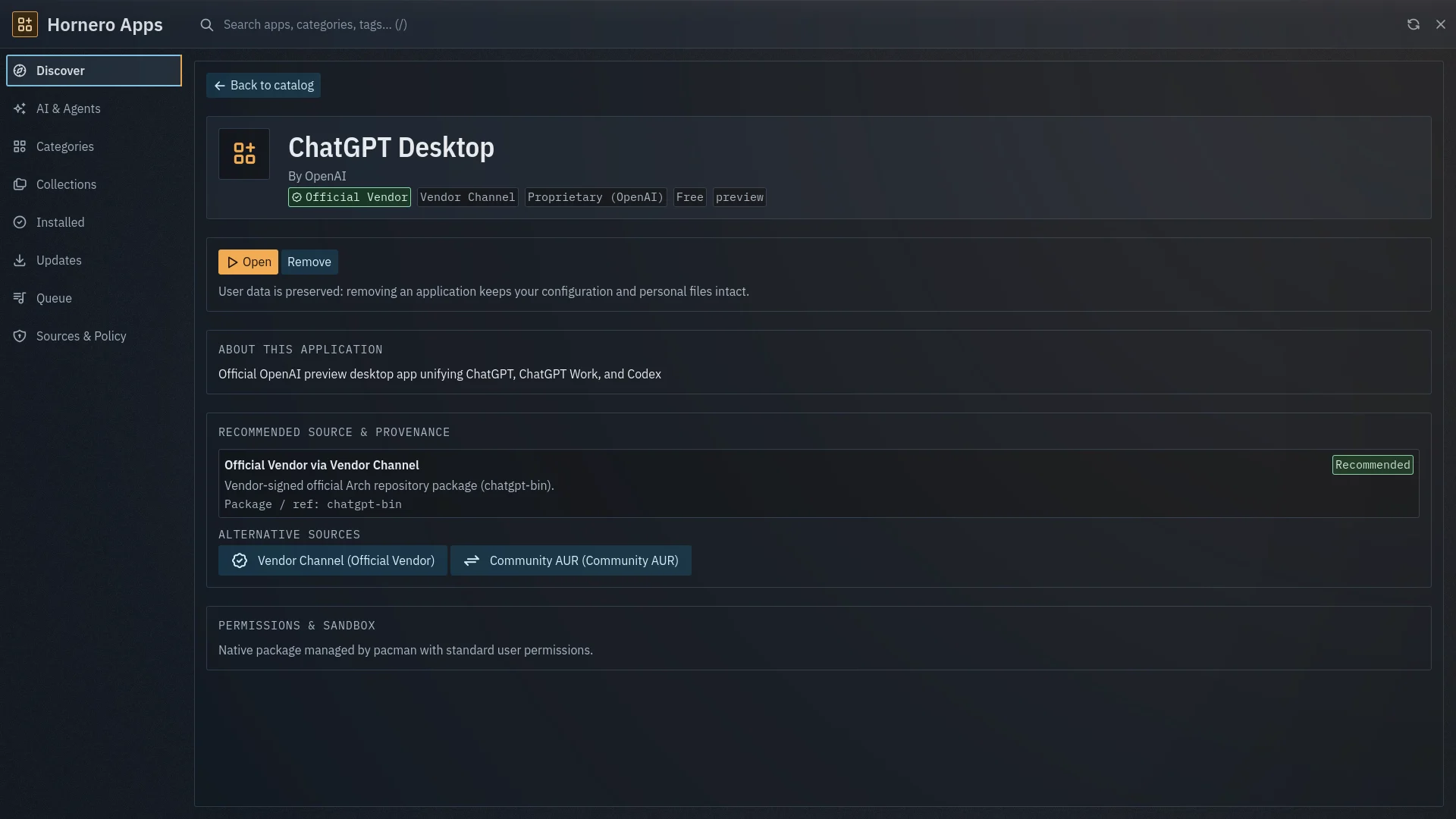
Interactive public cataloghornero@ee8f866 · 2026-11-28
Search by name, publisher, summary, or tag, filter by category, collection, or provenance tier, and copy the exact command to install or preview with --dry-run.
Showing 271 of 271 applications
AI Coding & Agents
Ulises Jeremias / Agent Toolkit
V-native capability orchestrator for AI skills, agents, loops, and MCP templates
Education, Science & Accessibility
Damien Elmes
A smart spaced repetition flashcard program
Creative Studio & Audio
Ardour Developers
Professional-grade digital audio workstation
Creative Studio & Audio
Storytold
Launcher and manager for ArtCraft creative AI tools and model runtimes
Experimental opt-in suite; distributed via signed vendor packages rather than Flathub or official Arch repositories.
Security & Privacy
Bitwarden Inc.
A secure and free password manager for all of your devices
Creative Studio & Audio
Blender Foundation
A fully integrated 3D graphics creation suite
Web Browsers
Brave Software
Fast Internet, AI, Adblock
AI Assistants & Runtimes
OpenAI
Official OpenAI preview desktop app unifying ChatGPT, ChatGPT Work, and Codex
Preview desktop release distributed via OpenAI's signed vendor pacman repository.
AI Assistants & Runtimes
Anthropic
Official Anthropic web interface packaged as an isolated HorneroOS Chromium WebApp
AI Coding & Agents
Anysphere
AI-first code editor built on VS Code with integrated agentic editing and chat
Proprietary editor distributed via official AppImage or community AUR package; Electron Wayland flags may be required.
Communication & Collaboration
Discord Inc.
All-in-one voice and text chat for gamers
Web Browsers
Mozilla
Fast, Private & Safe Web Browser
Utilities & System Tools
Martin Abente Lahaye
A permissions manager for Flatpak
Utilities & System Tools
Lorenzo Paderi
Manage AppImages
Creative Studio & Audio
The GIMP team
GNU Image Manipulation Program
AI Coding & Agents
Agent-first VS Code-derived IDE with multi-agent orchestration and unified keyring auth
Requires Google account sign-in via the system keyring.
Web Browsers
The browser built to be yours
Community-maintained source; verify maintainer and PKGBUILD/manifest before installing.
Creative Studio & Audio
Guitarix Developers
A simple mono guitar amplifier and FX for JACK using Faust
Gaming & Emulation
Heroic Games Launcher
Play Epic, GOG and Amazon Games
Creative Studio & Audio
The Inkscape Community
Professional vector graphics editor
AI Assistants & Runtimes
Menlo Research (Jan)
Open-source local AI desktop workspace with bundled llama.cpp inference engine
Creative Studio & Audio
KDE
A non-linear video editor for Linux using the MLT video framework
Security & Privacy
KeePassXC Team
Cross-platform community-driven port of Keepass password manager
Creative Studio & Audio
Krita Foundation
Edit and paint images
Productivity & Office
The Document Foundation
LibreOffice branch which contains new features and program enhancements
AI Assistants & Runtimes
LM Studio
Desktop studio for discovering, running, and serving local GGUF and MLX language models
Proprietary EULA; official Linux distribution is an x86_64 AppImage (the Flathub listing is community-maintained and unverified).
Utilities & System Tools
Tien Do Nam
Share files to nearby devices
Gaming & Emulation
Lutris Team
Open Gaming Platform
Communication & Collaboration
Ismael Martinez
Unofficial Microsoft Teams client for Linux
Creative Studio & Audio
OBS Project
Free, open source software for live streaming and recording
Productivity & Office
Obsidian
A powerful knowledge base that works on top of a local folder of plain text Markdown files
AI Assistants & Runtimes
Ollama
First-class Arch official package with dedicated CUDA, ROCm, and Vulkan backend packages in [extra]
AI Coding & Agents
Anomaly
Open-source terminal AI coding agent in Arch [extra] with native ACP support
Security & Privacy
Proton AG
ProtonVPN GTK app, Maintained by Community
Creative Studio & Audio
Cockos Incorporated
A complete digital audio production application for computers
Communication & Collaboration
Signal Foundation
Signal Private Messenger for Linux
Communication & Collaboration
Slack Technologies Inc.
Business communication
Community-maintained source; verify maintainer and PKGBUILD/manifest before installing.
Multimedia & Streaming
Spotify
Online music streaming service
Community-maintained source; verify maintainer and PKGBUILD/manifest before installing.
Gaming & Emulation
Valve Corporation
Valve's digital software delivery system
Security & Privacy
Tailscale Inc.
A mesh VPN that makes it easy to connect your devices, wherever they are.
Communication & Collaboration
Telegram FZ-LLC
Official Telegram Desktop client
Productivity & Office
MZLA Technologies, part of the Mozilla Foundation
Standalone mail and news reader from mozilla.org
AI Coding & Agents
Veasel Labs
V-native AI coding agent (veasel and veasel-tui) for local and cloud model workflows
AI Coding & Agents
Microsoft
Official proprietary Microsoft Visual Studio Code with GitHub Copilot and Marketplace
Proprietary Microsoft build with telemetry; the open-source Code - OSS build is available in official Arch repositories.
Multimedia & Streaming
VideoLAN et al.
Free and open source cross-platform multimedia player and framework
AI Coding & Agents
VSCodium
Telemetry-free binary build of VS Code; verified on Flathub
AI Coding & Agents
Zed
High-performance GPU-accelerated code editor with built-in AI and ACP agent panel
Web Browsers
Zen Team
Stay focused, browse faster
Security & Privacy
1Password
Cross-platform password manager with browser integration, passkeys, and SSH agent
Community-maintained source; verify maintainer and PKGBUILD/manifest before installing.
AI Coding & Agents
sigoden
All-in-one Rust LLM CLI featuring REPL, shell assistant, RAG, and tool agents
AI Coding & Agents
Aider AI
Terminal AI pair programming assistant that edits code directly in your Git repository
AI Assistants & Runtimes
Jeffry Samuel / Alpaca
Native GTK4/Libadwaita client for Ollama and OpenAI-compatible providers; verified on Flathub
AI Coding & Agents
Sourcegraph
Agentic coding CLI and editor extension by Sourcegraph
Install ampcode (not the unrelated AUR package 'amp', which is a Rust modal text editor).
Development & DevOps
Android Open Source Project
IDE for Android app development
Community-maintained source; verify maintainer and PKGBUILD/manifest before installing.
AI Assistants & Runtimes
Mintplex Labs
Full-stack desktop AI workspace for private RAG, local LLMs, and custom agents
Prefer the official upstream AppImage or Docker container; community AUR packages may lag behind upstream releases.
Productivity & Office
Anytype Association
Local-first, end-to-end encrypted workspace for notes, docs, tasks, and knowledge graphs
Community-maintained source; verify maintainer and PKGBUILD/manifest before installing.
Development & DevOps
Apache Software Foundation
Modern open-source data exploration and business intelligence visualization platform
Productivity & Office
AppFlowy developers
Open Source Notion Alternative
Creative Studio & Audio
Storytold
AI image and video crafting studio with local node-based generation workflows
Distributed via vendor-signed packages rather than official Arch repositories or Flathub.
Creative Studio & Audio
Igara Studio
Animated sprite editor and pixel art tool for games and retro graphics
Community-maintained source; verify maintainer and PKGBUILD/manifest before installing.
Creative Studio & Audio
Muse Group
A program that lets you manipulate digital audio waveforms
Multimedia & Streaming
Audiobookshelf
Self-hosted audiobook and podcast server with mobile and desktop sync
Utilities & System Tools
Balena
Graphical utility to flash OS images safely to SD cards and USB drives
Community-maintained source; verify maintainer and PKGBUILD/manifest before installing.
Utilities & System Tools
The GNOME Project
A graphical directory tree analyzer
AI Assistants & Runtimes
Bavarder Contributors
Simple GTK4 chat client for interacting with AI models (archived upstream)
Development & DevOps
Beekeeper Studio, Inc
The SQL Editor and Database Manager Of Your Dreams
Community-maintained source; verify maintainer and PKGBUILD/manifest before installing.
Creative Studio & Audio
Bitwig GmbH
Modern music production and performance
Creative Studio & Audio
JannisX11
Blockbench - A boxy 3D model editor
Gaming & Emulation
The Bottles Contributors
Run Windows software
Development & DevOps
Dvlv / BoxBuddy
Graphical user interface for Distrobox
Development & DevOps
UseBruno
Fast, Git-friendly open-source API client storing collections as plain text files
Community-maintained source; verify maintainer and PKGBUILD/manifest before installing.
Productivity & Office
Kovid Goyal
Ebook management application
Creative Studio & Audio
Carla developers
Audio Plugin Host
AI Coding & Agents
Charmbracelet
Pipeline-friendly AI CLI by Charm
Pipeline-friendly AI CLI by Charm.
AI Assistants & Runtimes
OpenAI
Zero-install official web surface; ideal for HorneroOS standalone Chromium webapp wrapper
AI Assistants & Runtimes
ChatQT Contributors
Qt-native AI chat client supporting remote Streamable HTTP MCP servers and OpenAI-compatible endpoints
AI Assistants & Runtimes
CherryHQ
Multi-provider desktop client with MCP and local/cloud model support
Web Browsers
The Chromium Authors
A web browser built for speed, simplicity, and security
AI Coding & Agents
Anthropic
Anthropic's official terminal coding agent with native HorneroOS integration
AI Assistants & Runtimes
Anthropic
Community-repackaged Claude Desktop for Arch Linux (unofficial; web app or Claude Code recommended)
Unofficial community AUR repackage; Cowork VM features require KVM (/dev/kvm), QEMU, 8+ GB RAM, and 15-20 GB disk space.
AI Coding & Agents
Cline Bot Inc.
Autonomous AI coding agent available as an official CLI and IDE extension
AI Coding & Agents
Microsoft / Arch Linux
Open-source build of Visual Studio Code from official Arch repositories
Creative Studio & Audio
Comfy Org
Requires GPU drivers (CUDA or ROCm) and PyTorch environment setup plus downloaded diffusion checkpoints
Requires GPU drivers (CUDA or ROCm) and PyTorch environment setup plus downloaded diffusion checkpoints.
AI Coding & Agents
Continue Dev
Open-source coding assistant extension for VS Code/VSCodium and JetBrains IDEs
Gaming & Emulation
CoolerControl Developers
A program to monitor and control your cooling devices
Utilities & System Tools
CoreCtrl Developers
Core control application
Security & Privacy
Skymatic GmbH
Encryption for your cloud made easy
Creative Studio & Audio
darktable developers
Utility to organize and develop raw images
Development & DevOps
JetBrains s.r.o.
The Cross-Platform IDE for Databases and SQL
Community-maintained source; verify maintainer and PKGBUILD/manifest before installing.
Creative Studio & Audio
Blackmagic Design
Professional non-linear video editing, color grading, VFX, and audio post-production suite
Community-maintained source; verify maintainer and PKGBUILD/manifest before installing.
Development & DevOps
DBeaver Corporation
Free universal SQL Client for developers and database administrators (community edition)
AI Assistants & Runtimes
DeepSeek
Official DeepSeek web chat interface
Utilities & System Tools
Michael Terry
Easy to use backup tool based on Restic
AI Coding & Agents
Cognition
Agentic AI IDE by Cognition (formerly Windsurf) with Cascade multi-file editing
Proprietary IDE distributed via official installer or AUR (devin-desktop-next).
Development & DevOps
Loft Labs
Client-only devcontainers tool for reproducible workspaces across local and cloud backends
Community-maintained source; verify maintainer and PKGBUILD/manifest before installing.
Creative Studio & Audio
digiKam Team
An advanced digital photo management application
Development & DevOps
Luca Di Maio (Distrobox)
Use any linux distribution inside your terminal.
Development & DevOps
Docker, Inc.
Desktop GUI and VM runtime for building, running, and managing Docker containers
Community-maintained source; verify maintainer and PKGBUILD/manifest before installing.
Gaming & Emulation
Dolphin Emulator Project
A Gamecube and Wii emulator
Gaming & Emulation
Stenzek
PlayStation Emulator
Community-maintained source; verify maintainer and PKGBUILD/manifest before installing.
Development & DevOps
Eclipse Foundation
The essential tools for any Java developer, including a Java IDE, a Git client, XML Editor, Maven and Gradle integration
Community-maintained source; verify maintainer and PKGBUILD/manifest before installing.
Communication & Collaboration
Element Creations Ltd
Glossy Matrix collaboration client — desktop version.
Multimedia & Streaming
KDE
A simple music player aiming to provide a nice experience for its users
Development & DevOps
Free Software Foundation
The extensible, customizable, self-documenting real-time display editor
Security & Privacy
Ente Developers
FOSS, cross-platform 2FA app
Productivity & Office
The Evolution Team
Manage your email, contacts and schedule
AI Coding & Agents
Daniel Miessler / Fabric
Open-source framework for augmenting workflows with modular AI prompt patterns
Requires configuring an LLM provider API key or local Ollama endpoint during initial setup.
Creative Studio & Audio
FFmpeg Project
Complete solution to record, convert and stream audio and video
Creative Studio & Audio
Figma, Inc.
Collaborative interface design, prototyping, and design system platform
Utilities & System Tools
Paolo Bacchilega
Create and modify archives
Utilities & System Tools
KDE
View disk usage information
Web Browsers
Ablaze
Privacy-focused, highly customizable web browser built on Firefox
Community-maintained source; verify maintainer and PKGBUILD/manifest before installing.
Productivity & Office
John Factotum
A simple and modern GTK eBook reader
Creative Studio & Audio
FreeCAD Team
Feature based parametric 3D CAD modeler
Gaming & Emulation
Feral Interactive
A daemon/lib combo that allows games to request a set of optimisations be temporarily applied to the host OS
Gaming & Emulation
Valve Corporation
SteamOS session compositing window manager
Education, Science & Accessibility
KDE
Educational software suite comprising of numerous activities for children aged 2 to 10
AI Coding & Agents
Official Google Gemini terminal coding agent packaged in Arch [extra]
Education, Science & Accessibility
GeoGebra Institute
Dynamic mathematics software with interactive graphics, algebra and spreadsheet
Development & DevOps
GitButler, Inc.
Modern Git client with virtual branches for managing parallel workstreams effortlessly
Community-maintained source; verify maintainer and PKGBUILD/manifest before installing.
AI Coding & Agents
GitHub
GitHub Copilot terminal coding agent for interactive planning, edits, and PR workflows
Requires an active GitHub Copilot subscription; distributed via official npm/GitHub channels rather than official Arch repositories.
Development & DevOps
GitKraken
Visual Git GUI client with interactive commit graph, merge conflict tool, and PR workflows
Community-maintained source; verify maintainer and PKGBUILD/manifest before installing.
Utilities & System Tools
The GNOME Project
Simple GNOME application to access virtual systems
Utilities & System Tools
The GNOME Project
Disk Management Utility for GNOME
Education, Science & Accessibility
John W. Eaton and others
A high-level language, primarily intended for numerical computations
Education, Science & Accessibility
GNU Project
Free statistical analysis program compatible with SPSS syntax and data files
Community-maintained source; verify maintainer and PKGBUILD/manifest before installing.
Creative Studio & Audio
The Godot Engine Community
Advanced cross-platform 2D and 3D game engine
Development & DevOps
JetBrains s.r.o.
Capable and Ergonomic Go IDE
Community-maintained source; verify maintainer and PKGBUILD/manifest before installing.
AI Assistants & Runtimes
Official Gemini API workbench, prompt studio, and model playground
AI Assistants & Runtimes
Standalone multi-agent control center desktop application (Antigravity 2.0)
Distributed as official upstream archives; community AUR packages may lag behind releases.
AI Coding & Agents
Terminal agent CLI (agy) sharing unified keyring authentication with Antigravity
Productivity & Office
Collaborative cloud word processor by Google launched as an isolated WebApp
Productivity & Office
Google Drive cloud storage and file collaboration launched as an isolated WebApp
AI Assistants & Runtimes
Official Google Gemini web assistant
Communication & Collaboration
Video conferencing and team meetings by Google launched as an isolated WebApp
AI Assistants & Runtimes
Official AI research and source-grounded notebook assistant
Productivity & Office
Collaborative cloud spreadsheets by Google launched as an isolated WebApp
AI Coding & Agents
Block / AAIF
Linux Foundation AAIF extensible coding & task agent (CLI + desktop)
Gaming & Emulation
Benjamim Gois
A GUI to help manage Vulkan/OpenGL overlays
Utilities & System Tools
GParted Team
A Partition Magic clone, frontend to GNU Parted
AI Assistants & Runtimes
Nomic AI
Privacy-focused local LLM desktop app for running open-weight models offline
Official Linux delivery is an x86_64 installer; the Flathub build is community-maintained and older.
AI Assistants & Runtimes
xAI
Official xAI Grok web interface
Creative Studio & Audio
HandBrake Team
Multithreaded video transcoder
Multimedia & Streaming
George Florea Bănuș
Video player built with Qt/QML on top of libmpv
Development & DevOps
CNCF / Headlamp
Extensible, user-friendly Kubernetes web and desktop cluster dashboard
Community-maintained source; verify maintainer and PKGBUILD/manifest before installing.
Development & DevOps
Blaž Hrastnik
A post-modern modal text editor
AI Coding & Agents
Nous Research
Autonomous AI assistant integrated natively into HorneroOS with sandboxed execution
Development & DevOps
Kong
Open-source API client
Community-maintained source; verify maintainer and PKGBUILD/manifest before installing.
Development & DevOps
JetBrains s.r.o.
Java and Kotlin IDE with agents
Community-maintained source; verify maintainer and PKGBUILD/manifest before installing.
Creative Studio & Audio
Invoke AI
No Arch/AUR package; requires guided Python/PyTorch GPU setup via official installer
No Arch/AUR package; requires guided Python/PyTorch GPU setup via official installer.
Gaming & Emulation
itch.io
Install, update and play indie games
Community-maintained source; verify maintainer and PKGBUILD/manifest before installing.
Multimedia & Streaming
Izzie Walton
Desktop client for Jellyfin media server
AI Coding & Agents
JetBrains
Official manager for installing and updating JetBrains IDEs and AI coding tools
Proprietary utility distributed via JetBrains archive or community AUR package.
Communication & Collaboration
8x8 / Jitsi
Encrypted open-source video conferencing launched as an isolated WebApp
Productivity & Office
Laurent Cozic (Joplin)
open source note taking and to-do application
Community-maintained source; verify maintainer and PKGBUILD/manifest before installing.
Development & DevOps
Project Jupyter
JupyterLab computational environment
Utilities & System Tools
KDE
Adds communication between KDE and your smartphone
Creative Studio & Audio
The KiCad Developers
Electronic schematic and printed circuit board (PCB) design tools
AI Coding & Agents
AWS Kiro
Terminal agent and background Crew runtime for spec-driven development from AWS Kiro
Requires AWS Builder ID or compatible Kiro authentication.
AI Coding & Agents
AWS Kiro
Spec-driven agentic IDE by AWS with structured requirements, design, and task flows
Install kiro-ide (not the unrelated AUR package 'kiro', which is a minimal UTF-8 text editor).
Education, Science & Accessibility
The Kiwix Foundation
Offline reader for Web content, especially intended to make Wikipedia available offline
Multimedia & Streaming
Team Kodi
A software media player and entertainment hub for digital media (gl renderer)
Development & DevOps
Jesse Duffield
Simple terminal UI for git commands
Creative Studio & Audio
LibreSprite Contributors
Animated sprite editor and pixel art tool, based on the last GPL2 commit of Aseprite
Web Browsers
LibreWolf Community
LibreWolf Web Browser
AI Assistants & Runtimes
ggerganov / llama.cpp
High-performance C/C++ LLM inference engine supporting GGUF models across CPU and GPU
Not packaged in official Arch [extra]; build from AUR or upstream source for your target GPU backend.
Creative Studio & Audio
LMMS Developers
The Linux MultiMedia Studio
Productivity & Office
Logseq, Inc.
Connect your notes and knowledge
Creative Studio & Audio
Mikael Finstad
Losslessly trim audio and video
Community-maintained source; verify maintainer and PKGBUILD/manifest before installing.
Gaming & Emulation
MangoHud Contributors
A Vulkan overlay layer for monitoring FPS, temperatures, CPU/GPU load and more.
Communication & Collaboration
Mattermost, Inc.
Mattermost Desktop application
Productivity & Office
Microsoft
Microsoft 365 web productivity suite (Word, Excel, PowerPoint, Outlook) as a WebApp
AI Assistants & Runtimes
Microsoft
Official Microsoft Copilot web interface
Web Browsers
Microsoft Corporation
Introducing the new Microsoft Edge web browser. It’s time to expect more. More privacy. More control. More productivity. More value.
Community-maintained source; verify maintainer and PKGBUILD/manifest before installing.
Gaming & Emulation
Mojang AB
Create your own world in one of the most popular video games
Community-maintained source; verify maintainer and PKGBUILD/manifest before installing.
Utilities & System Tools
Mission Center Developers
Monitor your CPU, Memory, Disk, Network and GPU usage
AI Assistants & Runtimes
Mistral AI
Official Mistral AI web chat assistant
Gaming & Emulation
Moonlight Game Streaming Team
GameStream client for PCs
Multimedia & Streaming
The mpv player contributors
a free, open source, and cross-platform media player
AI Assistants & Runtimes
Msty Studio
Desktop AI workspace combining local models, online providers, and knowledge stacks
Prefer the official upstream AppImage; community AUR packages may be unmaintained or outdated.
Security & Privacy
Mullvad
Privacy-first WireGuard/OpenVPN client with anonymous account numbers
Community-maintained source; verify maintainer and PKGBUILD/manifest before installing.
AI Coding & Agents
Meta
Meta's terminal coding agent with workspace context and multi-step tool execution
Requires Meta account login or a META_API_KEY.
Creative Studio & Audio
MuseScore Limited
Create, play and print beautiful sheet music
Creative Studio & Audio
Natron
Compose industry-grade VFX and Motion Graphics.
Community-maintained source; verify maintainer and PKGBUILD/manifest before installing.
Development & DevOps
Neovim Contributors
Fork of Vim aiming to improve user experience, plugins, and GUIs
Creative Studio & Audio
Steven Atkinson (NAM)
Open-source neural network guitar amplifier and pedal capture plugin
Community-maintained source; verify maintainer and PKGBUILD/manifest before installing.
AI Assistants & Runtimes
Newelle Contributors
GTK4 AI virtual assistant supporting workspaces, subagents, MCP server exposure, and local models
Utilities & System Tools
Nextcloud GmbH
Nextcloud desktop client
Productivity & Office
Notion Labs
All-in-one connected workspace for notes, wikis, databases, and project tracking
Community-maintained source; verify maintainer and PKGBUILD/manifest before installing.
Productivity & Office
KDE
Document Viewer
Productivity & Office
ONLYOFFICE
Office productivity suite
AI Assistants & Runtimes
Onyx AI
Open-source enterprise RAG and AI chat platform connecting team knowledge sources
Deploy via official Docker Compose or onyx-cli (unrelated to AUR packages named 'onyx' or 'onyx-desktop').
AI Assistants & Runtimes
Open WebUI
Self-hosted extensible web interface for Ollama and OpenAI-compatible LLM backends
Requires a container runtime (Docker or Podman) or a dedicated Python environment and LLM backend such as Ollama.
AI Coding & Agents
OpenAI
OpenAI's official terminal coding agent for reading, editing, and testing repositories
AI Coding & Agents
All Hands AI
Requires Docker socket & sandbox runtime container configuration
Requires Docker socket & sandbox runtime container configuration.
Gaming & Emulation
Adam Honse, OpenRGB Team
Open source RGB lighting control that doesn't depend on manufacturer software
Creative Studio & Audio
The OpenSCAD Developers
The programmers solid 3D CAD modeller
Creative Studio & Audio
OpenToonz Contributors
A full-featured 2D animation creation software
Web Browsers
Opera
Your personal browser
Community-maintained source; verify maintainer and PKGBUILD/manifest before installing.
Education, Science & Accessibility
The GNOME Project
Screen reader for individuals who are blind or visually impaired
AI Assistants & Runtimes
Giorgos Gozadinos
Textual-based TUI client for Ollama; AUR package flagged out-of-date
Textual-based TUI client for Ollama; AUR package flagged out-of-date.
Gaming & Emulation
PCSX2 Team
PlayStation 2 emulator
Productivity & Office
PDF Arranger Contributors
Helps merge or split PDF documents and rotate, crop and rearrange pages
Utilities & System Tools
Giorgio Tani
Free file archiver utility
Creative Studio & Audio
Kaleidos / Penpot
Open-source vector design and prototyping tool built on open web standards (SVG)
AI Assistants & Runtimes
Perplexity AI
Official AI search and research web app
Development & DevOps
pgAdmin Development Team
Comprehensive administration and development platform for PostgreSQL databases
Community-maintained source; verify maintainer and PKGBUILD/manifest before installing.
Utilities & System Tools
Small Mammal Collective
Easy to use backup tool to keep your data safe
Gaming & Emulation
libratbag developers
GTK application to configure gaming mice
Multimedia & Streaming
Plex
Plex client for desktop computers
Development & DevOps
Red Hat, Inc.
Manage Podman and other container engines from a single UI and tray.
AI Assistants & Runtimes
Quora
Official Quora Poe multi-model web hub
Security & Privacy
Safing
Privacy-oriented application firewall and network activity monitor for Linux
Community-maintained source; verify maintainer and PKGBUILD/manifest before installing.
Development & DevOps
Postman Inc.
API Development Environment
Community-maintained source; verify maintainer and PKGBUILD/manifest before installing.
Gaming & Emulation
Henrik Rydgård
A PlayStation Portable emulator
Gaming & Emulation
Prism Launcher Contributors
Minecraft launcher with ability to manage multiple instances
Gaming & Emulation
Vysp3r / ProtonPlus
GTK4 manager for installing Proton-GE, Wine-GE, and compatibility tools for Steam and Lutris
Community-maintained source; verify maintainer and PKGBUILD/manifest before installing.
Gaming & Emulation
DavidoTek
Install Wine- and Proton-based compatibility tools
Development & DevOps
JetBrains s.r.o.
Python IDE with agents
Community-maintained source; verify maintainer and PKGBUILD/manifest before installing.
Multimedia & Streaming
The qBittorrent Project
An advanced BitTorrent client programmed in C++, based on Qt toolkit and libtorrent-rasterbar
Education, Science & Accessibility
QGIS Development Team
Geographic Information System (GIS) that supports vector, raster & database formats
Creative Studio & Audio
Rui Nuno Capela (Qtractor)
Audio/MIDI multitrack sequencer
AI Coding & Agents
Alibaba Qwen
Open-source terminal coding agent optimized for Qwen models
Education, Science & Accessibility
R Foundation
Language and environment for statistical computing and graphics
Creative Studio & Audio
The RawTherapee Team
A powerful cross-platform raw image processing program
Utilities & System Tools
Nick Craig-Wood / rclone
rsync for cloud storage
AI Assistants & Runtimes
Ibrahim Cetin
Verified Flathub private Ollama GUI client
Utilities & System Tools
Remmina Project
Remote desktop client written in GTK+
Utilities & System Tools
nokyan
Monitor for system resources and processes
Gaming & Emulation
libretro
Reference frontend for the libretro API
Communication & Collaboration
Rocket.Chat
Open Source Team Communication
Community-maintained source; verify maintainer and PKGBUILD/manifest before installing.
AI Coding & Agents
Roo Code
Install inside VS Code, VSCodium, Code-OSS, or Cursor via extension marketplace
Gaming & Emulation
RPCS3 Developers
Open-source Sony PlayStation 3 Emulator
Community-maintained source; verify maintainer and PKGBUILD/manifest before installing.
Development & DevOps
Posit (RStudio)
Integrated development environment for R statistical computing, notebooks, and data science
Community-maintained source; verify maintainer and PKGBUILD/manifest before installing.
Utilities & System Tools
RustDesk
Secure remote desktop access
Development & DevOps
JetBrains s.r.o.
Powerful IDE for Rust
Community-maintained source; verify maintainer and PKGBUILD/manifest before installing.
Education, Science & Accessibility
Lifelong Kindergarten Group at the MIT Media Lab
Create stories, games, and animations, share with others around the world
Community-maintained source; verify maintainer and PKGBUILD/manifest before installing.
Creative Studio & Audio
Scribus developers
Desktop publishing software
Creative Studio & Audio
Meltytech, LLC
Cross-platform Qt based Video Editor
Gaming & Emulation
VinegarHQ & Sober contributors
Play, chat & explore on Roblox
Utilities & System Tools
pwr-Solaar
Linux device manager for a wide range of Logitech devices
Creative Studio & Audio
Sonic Pi Core Team
Code-based music creation
Community-maintained source; verify maintainer and PKGBUILD/manifest before installing.
Education, Science & Accessibility
Brailcom / Speech Dispatcher
High-level device independent layer for speech synthesis interface
Productivity & Office
Standard Notes Ltd.
A simple and private place for your notes, thoughts, and life's work
Community-maintained source; verify maintainer and PKGBUILD/manifest before installing.
Education, Science & Accessibility
Stellarium team
Software which renders realistic skies in real time with OpenGL
Multimedia & Streaming
Jonas Kvinge
A music player aimed at audio enthusiasts and music collectors
Development & DevOps
Sublime HQ Pty Ltd
Sophisticated text editor for code, markup and prose
Community-maintained source; verify maintainer and PKGBUILD/manifest before installing.
Gaming & Emulation
LizardByte
Self-hosted low-latency game streaming host compatible with Moonlight clients
Community-maintained source; verify maintainer and PKGBUILD/manifest before installing.
Utilities & System Tools
Syncthing Foundation
Open Source Continuous Replication / Cluster Synchronization Thing
Creative Studio & Audio
Synfig
Professional vector animation program (GUI)
AI Coding & Agents
Ping.gg / T3
Unified desktop and web control surface for local coding agents like Claude Code and Codex
Communication & Collaboration
TeamSpeak Systems, Inc.
TeamSpeak is software for quality voice communication via the Internet
AI Coding & Agents
aandrew-me
Lightweight terminal AI client in Arch [extra] requiring no API key
Multimedia & Streaming
TIDAL
Lossless HiFi music streaming client packaged as an isolated WebApp
Community-maintained source; verify maintainer and PKGBUILD/manifest before installing.
Utilities & System Tools
Linux Mint / Timeshift
A system restore utility for Linux
Productivity & Office
Doist
Planner & Calendar
Community-maintained source; verify maintainer and PKGBUILD/manifest before installing.
Web Browsers
The Tor Project
Securely and easily download, verify, install, and launch Tor Browser in Linux
Multimedia & Streaming
The Transmission Project
Fast, easy, and free BitTorrent client (Qt GUI)
Creative Studio & Audio
Unity Technologies
Manage game engine installations
Community-maintained source; verify maintainer and PKGBUILD/manifest before installing.
AI Coding & Agents
Veasel Labs
Local-first coding workspace with Focus & World and bundled Veasel backend
Active pre-release cadence; updates are shipped via GitHub Releases and AUR.
Utilities & System Tools
Ventoy
Create multiboot USB drives simply by copying ISO, WIM, and IMG files
Community-maintained source; verify maintainer and PKGBUILD/manifest before installing.
Security & Privacy
IDRIX (VeraCrypt)
Disk encryption with strong security based on TrueCrypt
Utilities & System Tools
virt-manager Contributors
Desktop user interface for managing virtual machines
Web Browsers
Vivaldi Technologies
An advanced browser made with the power user in mind.
Utilities & System Tools
Vorta contributors
Desktop Client for Borg Backup
Development & DevOps
JetBrains s.r.o.
JavaScript and TypeScript IDE
Community-maintained source; verify maintainer and PKGBUILD/manifest before installing.
Security & Privacy
Jason A. Donenfeld (WireGuard)
next generation secure network tunnel - tools for configuration
Development & DevOps
The Wireshark developer community
Network traffic and protocol analyzer/sniffer - Qt GUI
Productivity & Office
Xournalpp Developers
Handwriting notetaking software with PDF annotation support
Communication & Collaboration
Zoom Video Communications
Video Conferencing, Web Conferencing, Webinars, Screen Sharing
Community-maintained source; verify maintainer and PKGBUILD/manifest before installing.
Productivity & Office
Corporation for Digital Scholarship
A free, easy-to-use tool to help you collect, organize, cite, and share your research sources.
No applications match those filters.
Try clearing filters or searching with a broader term.
Workstation profileshorneroctl store profiles
Hornero Welcome and horneroctl store group the catalog into optional profiles. Every profile previews packages and licenses with --dry-run first and never installs proprietary or AUR entries silently.
Lean browser, editor, and Flatpak/AppImage runtime utilities.
Open-source baseline
horneroctl store profile-show minimalComplete everyday desktop with browser, office, media, and security.
Open-source baseline
Optional proprietary opt-in
horneroctl store profile-show everyday-desktopOffice suites, collaboration tools, email, and VPN connectivity.
Open-source baseline
Optional proprietary opt-in
horneroctl store profile-show work-productivityModern editors, containers, git UI, API testing, and AI coding agents.
Open-source baseline
Optional proprietary opt-in
horneroctl store profile-show software-developmentLocal LLM inference, agentic coding tools, and AI assistants.
Open-source baseline
Optional proprietary opt-in
horneroctl store profile-show ai-native-workstation3D, illustration, photo editing, video editing, and streaming.
Open-source baseline
Optional proprietary opt-in
horneroctl store profile-show creative-studioDAWs, virtual amps, plugin hosts, and notation tools.
Open-source baseline
Optional proprietary opt-in
horneroctl store profile-show music-audio-productionGame launchers, Proton managers, performance tools, and emulators.
Open-source baseline
Optional proprietary opt-in
horneroctl store profile-show gamingSpaced repetition, offline knowledge, astronomy, STEM, and writing.
Open-source baseline
Optional proprietary opt-in
horneroctl store profile-show education-researchTeams and governancehorneroctl store policy & manifest
Teams and shared workstations can restrict allowed provenance tiers, export tested software selections, and audit every mutation locally.
Block AUR or unverified Flathub entries before any transaction begins (also constrains what local AI assistants can propose).
horneroctl store policy set --mode verified-only --yesExport a reference machine’s packages and policy, preview the diff on another host with --dry-run, and apply with explicit confirmation.
horneroctl store manifest export ./team-workstation.json --yesEvery install, update, remove, policy, or manifest mutation appends a structured JSON record to ~/.local/state/hornero/store/audit.jsonl.
horneroctl store doctor --jsonHonest limitsTransparencia
Removing a Flatpak or Web App is clean in user space, while native pacman transactions modify the host root without a universal restore point (system-rollback remains planned).
ChatGPT Desktop runs as an official signed OpenAI Arch repo preview (installable_with_limitations). Claude Desktop has no official Arch package: use Claude Code CLI or the isolated https://claude.ai Web App. Google Antigravity ships official .tar.gz builds, agy CLI, and Python SDK.
AUR support is disabled by default and requires explicit opt-in and PKGBUILD review. Snap (snapd) is disabled and excluded from standard discovery.
Kernel-level anti-cheat is unsupported on Linux; Easy Anti-Cheat and BattlEye work only when a publisher enables Proton support.