Updates and recovery: no system rollback yet
HorneroOS has no system rollback today. No horneroctl command, no
Control Center button and no update flow creates or restores an
operating-system snapshot, and updating does not save a system restore
point first. Every current build reports its snapshot backend as
none.
This page separates what does exist from what does not, so an update
never rests on a safety net that is not there. The binding contract is
docs/SNAPSHOT_BACKEND_CONTRACT.md
in HorneroOS/hornero (issue HorneroOS/hornero#179): no HorneroOS
surface may claim a system rollback until its six-step virtual-machine
proof passes in full. It has not. See
Validation status.
In particular, none of the following exists today, whatever older drafts or screenshots suggest:
- a recovery list or recovery rollback subcommand (the only recovery subcommand is the read-only doctor below);
- restore points that bundle the system, Hornero settings and the Chromatic palette into one undo step;
- a pre/post system snapshot pair taken by a HorneroOS update;
- Control Center rollback settings (
services.rollback.*); - a tested way to boot a snapshot from the GRUB menu and keep using it, or to roll back across a kernel update.
Check recovery readiness
One read-only diagnostic exists:
horneroctl recovery doctor
horneroctl recovery doctor --json
It probes six things and changes nothing: the shipped snapshot
backend, the root filesystem type, the top-level /.snapshots store,
the snapper binary, /etc/snapper/configs/root, and the snapper
timeline/cleanup timer units. Expect it to report failed checks
today: the backend check fails while the backend is none, and the
command never succeeds claiming recovery is ready.
Read the output literally. A Btrfs root, a mounted store, an installed snapper or a present timer unit is readiness plumbing, not proof that a restore works. The doctor says so itself, and it never lists a snapshot as restorable.
What exists today
Updates
Checking is read-only; upgrading is a full Arch system upgrade:
horneroctl package check
horneroctl package upgrade --dry-run
horneroctl package upgrade --yes
The upgrade runs pkexec pacman -Syu. It is not limited to Hornero
packages, it does not hold or exclude the kernel, it creates no
system snapshot, and it promises no rollback. There is no option to
skip a snapshot, because there is no snapshot step to skip. Review
the pending list first, and treat every upgrade as the one-way
operation it currently is.
Control Center: Updates & backups
Control Center → Updates (pane id updates; open it with
horneroctl config gui --pane updates) is headed “Updates &
backups”. It shows pending system updates, offers the same full
upgrade behind a two-click arm-and-confirm, and warns when a reboot
is required to finish an update (it never reboots anything itself).
Its Dependencies & recovery panel keys on the backend the CLI
reports. While that backend is none it states plainly that update
rollback is unavailable and that no snapshot backend is recorded for
the system. The rest of the pane is configuration-level help,
described next: backups, a config-snapshot restore by id, a config
snapshot list/create card, a dependency check and a backup-schedule
recipe that is printed, never installed for you.
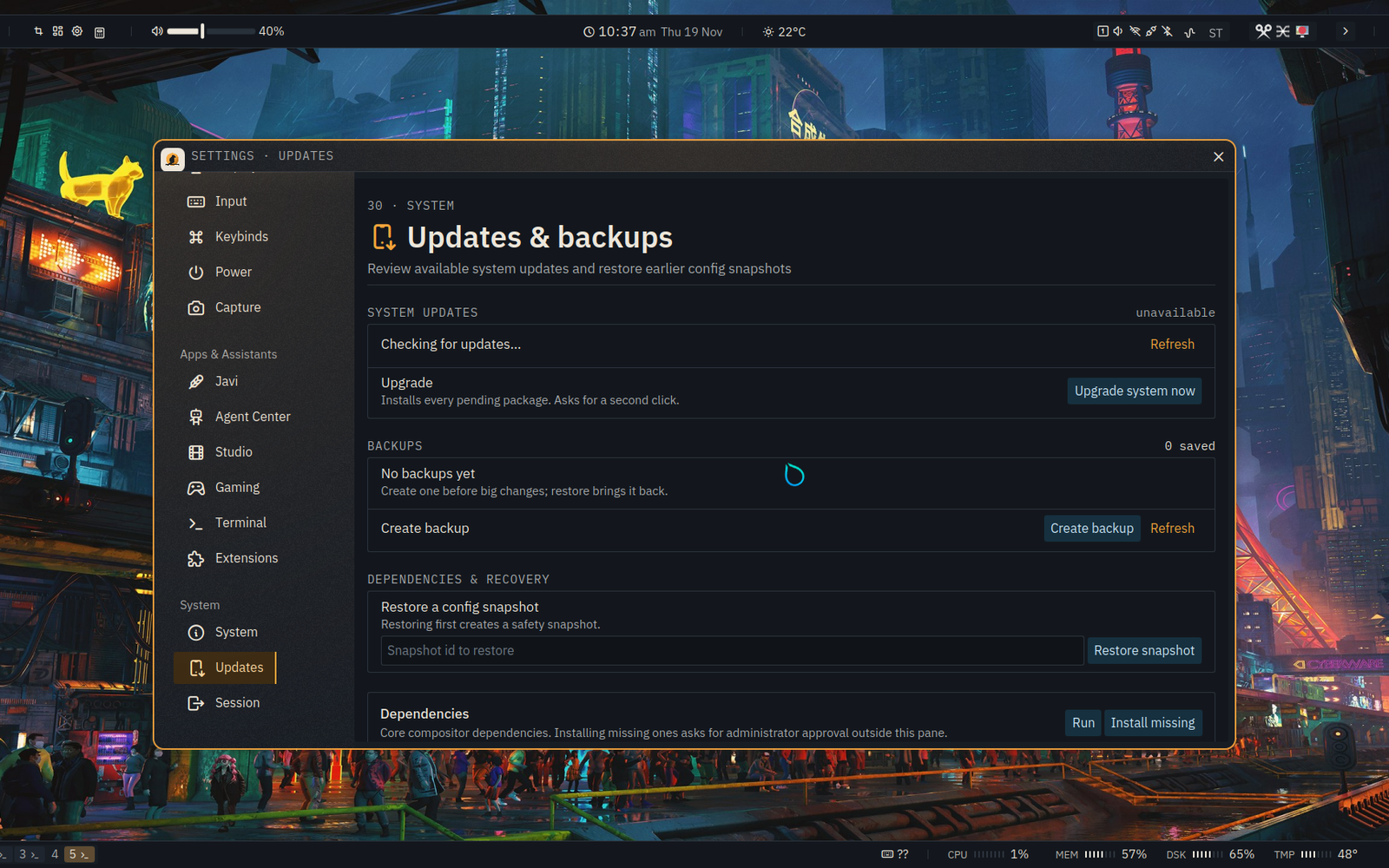
Settings → Updates on a machine with no backups saved yet. Nothing on this page is a system rollback, as this guide explains. Running-desktop capture from the maintainer’s machine, 19 November 2026.
Configuration snapshots
Configuration snapshots are settings archives. They are not system
snapshots, and the word “snapshot” in horneroctl means this and
only this:
horneroctl config snapshot list
horneroctl config snapshot create --dry-run
horneroctl config snapshot create --yes
horneroctl config snapshot restore config_20260101_020000 --dry-run
horneroctl config snapshot restore config_20260101_020000 --yes
Replace the example id with one from the list. A snapshot saves
Hornero-owned configuration roots plus package-inventory and host
metadata under the user data directory (hornero/snapshots in XDG
data, or HORNERO_SNAPSHOTS_DIR). Restoring first creates a safety
snapshot of the current configuration, then restores the selected
archive. It does not touch /, installed package files, boot
entries, databases or kernel state, and it cannot recover a failed
package transaction or an unbootable system.
Configuration backups
Backups archive the Hornero configuration directory into a timestamped tarball and restore it back:
horneroctl backup list
horneroctl backup create --dry-run
horneroctl backup create --yes
horneroctl backup restore <id> --dry-run
horneroctl backup schedule
Replace <id> with an archive from the list; restore also needs
--yes after its dry run. Archives live under XDG state
(hornero/backups, or HORNERO_BACKUP_DIR). The schedule command
only prints a cron/systemd recipe to copy; horneroctl never
installs a timer. Like configuration snapshots, a backup restores
Hornero configuration only, never the operating system.
Chromatic snapshots
Hornero Chromatic keeps its own transactional history: every apply snapshots the previous contents of the files it is about to write and restores them if the apply fails. You can step back yourself:
horneroctl appearance chromatic history
horneroctl appearance chromatic rollback --dry-run
horneroctl appearance chromatic rollback --steps 2 --yes
horneroctl appearance chromatic off --yes
The history lists the newest ten snapshots; rollback restores the state that many applies back (default one). This covers the palette and the files Chromatic generated. It is unrelated to system updates.
Fresh Btrfs layout
Fresh Btrfs installs create a top-level /@snapshots subvolume
mounted at /.snapshots, outside the root subvolume, so root
snapshots would not nest snapshots of snapshots. The layout also
keeps /home, /var/cache and /var/log on their own subvolumes
(/@home, /@cache and /@log). Existing
installations are not migrated to this layout. The layout is a place
a future backend could write to; by itself it installs no snapshot
tool and enables no rollback.
The opt-in snapshots capability
The edition catalogue has an opt-in snapshots capability (Desktop,
Studio and Gaming) that is off by default for every edition. Only
when it is selected does an install gain snapper, snap-pac,
grub-btrfs and inotify-tools, plus the snapper timeline/cleanup
timers and the grub-btrfs daemon. Selecting it does not flip the
reported backend: horneroctl still reports none.
When that capability landed on a Btrfs target that has the
/.snapshots store, the installer seeds a factory
/etc/snapper/configs/root and registers it, without overwriting an
existing administrator config. Anything else is a no-op. The factory
retention is bounded:
- numbered snapshots: newest 10 kept, and newest 5 of those marked important;
- timeline snapshots: 5 hourly and 7 daily, none weekly, monthly or yearly;
- a 30-minute minimum age before cleanup, a 50% space limit and a 20% free-space limit.
With that stack actually installed and configured, snap-pac can take pre/post snapper pairs around pacman transactions; that is snapper and snap-pac working as upstream tools, proven on a candidate VM install (step 2 below), not a HorneroOS restore-point feature. There is still no Hornero command to enumerate them as recovery targets or to restore one.
Scope matters if snapshots exist at all: the factory config covers
the root subvolume only and never home. Because /home,
/var/cache and /var/log are separate subvolumes they sit outside
a root snapshot, but everything else under root does not — including
application and database state in /var/lib and settings in /etc.
Replacing root reverts those paths too. A retention count also does
not guarantee free space: retained snapshots keep deleted or changed
data alive, so watch disk space rather than trusting the count.
The manual @-replacement procedure and its limits
The contract records exactly one restore mechanism with passing evidence: @ replacement — rename the root subvolume and put a writable snapshot of an existing snapper snapshot in its place — done from a running system in the proof VM, and described by the contract as the same swap from live media, within one kernel version. It is a manual administrator procedure with Btrfs tools, not a HorneroOS feature: no Hornero command performs, checks or undoes it for you.
Do not attempt it unless all of these hold:
- the root is Btrfs with the
/@snapshotsstore, and a snapshot you trust exists at@snapshots/<n>/snapshot; - the snapshot was taken under the kernel version that is still on the EFI system partition — if the update you are escaping changed the kernel, stop here (see the kernel limit below);
- you have copied out anything under root that must not revert, in
particular current state in
/var/lib, and you accept that everything in root returns to the snapshot moment.
From Live ISO media, in a terminal, replacing device names with
yours (lsblk -f lists them) and <n> with the snapshot number:
sudo cryptsetup open /dev/nvme0n1p2 root
sudo mount -o subvolid=5 /dev/mapper/root /mnt
ls /mnt/@snapshots/<n>/snapshot
ls /mnt/@snapshots/<n>/snapshot/usr/lib/modules
ls /mnt/@/usr/lib/modules
sudo mv /mnt/@ /mnt/@.pre-rollback-manual
sudo btrfs subvolume snapshot /mnt/@snapshots/<n>/snapshot /mnt/@
ls /mnt/@
sudo umount /mnt
The first line is for LUKS installs only; on an unencrypted install
mount the Btrfs partition directly. Verify the snapshot exists
before the rename; if the snapshot command then fails (wrong
number, no space), put the original root back immediately with
sudo mv /mnt/@.pre-rollback-manual /mnt/@ before unmounting or
rebooting. Keeping the renamed original is also the manual undo:
swap it back the same way. Nothing in these steps touches @home,
and they do not restore Hornero settings or the Chromatic palette —
those live under your home configuration, keep their current values,
and can be stepped back separately with the configuration and
Chromatic tools above if you want that.
Its recorded limits are part of the procedure, not fine print:
- Same kernel only. The kernel and initramfs live on the EFI
system partition, outside root snapshots. Restoring a root taken
before a kernel upgrade boots the new kernel against the old
/usr/lib/modulesand fails; the proof observed exactly that mismatch. No rollback-across-kernel-update claim is possible with this layout, and this page deliberately gives no kernel-copying variant. - GRUB snapshot boot is not proven recovery. In the proof the
GRUB snapshots menu rendered, but booting a read-only snapper
snapshot landed in emergency mode: the snapshot is read-only and
its fstab mounts
/as the root subvolume, so local filesystems fail. Never treat the boot menu alone as a recovery path. - Retention/GC is untested. The proof enabled the timers but observed no garbage-collection run, so bounded retention to the factory limits, and survival of a booted-from snapshot under GC, are not proven.
- No physical-hardware proof. The evidence is one disposable QEMU VM run on a candidate ISO (UEFI, Btrfs, unencrypted); the steps and failures are listed under Validation status.
By installation type
- Fresh Btrfs: gets the
/@snapshotsstore layout. No snapshot tool unless the opt-in capability was selected; still no HorneroOS system rollback either way. - Existing or migrated install: not converted: no store is added and no layout is migrated automatically. A migrated preview24 system stays in this group.
- ext4 or other non-Btrfs: the contracted Btrfs backend is unsupported, and the recovery doctor and Updates pane say so plainly. Only the configuration and Chromatic tools above apply. HorneroOS does not convert the filesystem.
- GRUB (UEFI or legacy BIOS): grub-btrfs entries can exist only with the opt-in capability, and booting one read-only is a recorded failure, not recovery.
- systemd-boot (UEFI only): there are no GRUB snapshot entries. GRUB and systemd-boot snapshot boot paths are separate implementations in the contract, and neither ships. The manual swap above does not use a boot menu, but its same-kernel and unproven-GC limits apply unchanged.
- LUKS: a snapshot never bypasses encryption: boot paths must still require the unlock, and the manual procedure starts by opening the LUKS device. The proof VM was unencrypted, so no LUKS restore is claimed as proven here.
If an update broke something today
Be honest with yourself about the options that actually exist:
- If only Hornero settings or colours went wrong, restore a configuration snapshot or backup, or roll Chromatic back, using the commands above. Preview with a dry run first.
- Run
horneroctl recovery doctorand keep its output for a bug report; it records exactly which readiness pieces your install has. It will not fix anything. - If the system itself is broken, HorneroOS offers no supported system rollback to fall back on. The manual @ replacement above is the only contract-evidenced mechanism, only within one kernel version and only if a suitable snapper snapshot already exists. Anything else — package downgrades, chroot repair, reinstalling — is ordinary Arch system administration outside any HorneroOS guarantee.
- Before the next upgrade, at least save what HorneroOS can save: a configuration snapshot and backup protect your Hornero settings even though they cannot protect the system.
Validation status
The contract’s disposable-VM proof (candidate ISO, 2026-11-03) is recorded step by step in HorneroOS/hornero. In short:
- Install from the accepted layout; first boot — PASS, after two installer defects the proof found were fixed.
- Create a snapshot / transaction pair — PASS: manual create and a snap-pac pre/post pair around a real full upgrade.
- Break the system with a bad upgrade — executed only as a marker mutation plus a full upgrade, not a deliberately broken package state.
- Boot the previous state from the boot menu — FAIL: read-only snapshot boot lands in emergency mode.
- Restore and match the snapshot point — PASS via @ replacement within one kernel; FAIL across a kernel change.
- Exercise GC to the retention bound — NOT TESTED: timers enabled, no GC run observed.
Until all six steps pass and are recorded, the release-readiness updates/rollback gate stays at FAIL and these docs keep saying there is no HorneroOS system rollback. A future Hornero restore command must wrap the @-replacement flow with explicit confirmation; until it exists and is proven, this page will not describe one.
Related
- Control Center map
- horneroctl
- Hornero Chromatic
- Troubleshooting
- Snapshot backend contract and update and recovery boundaries in HorneroOS/hornero