Troubleshooting by symptom
Start from what you see, run the read-only check for that symptom, and keep the output. Do not start from a fix: record the exact error and the steps that reproduce it first.
horneroctl doctor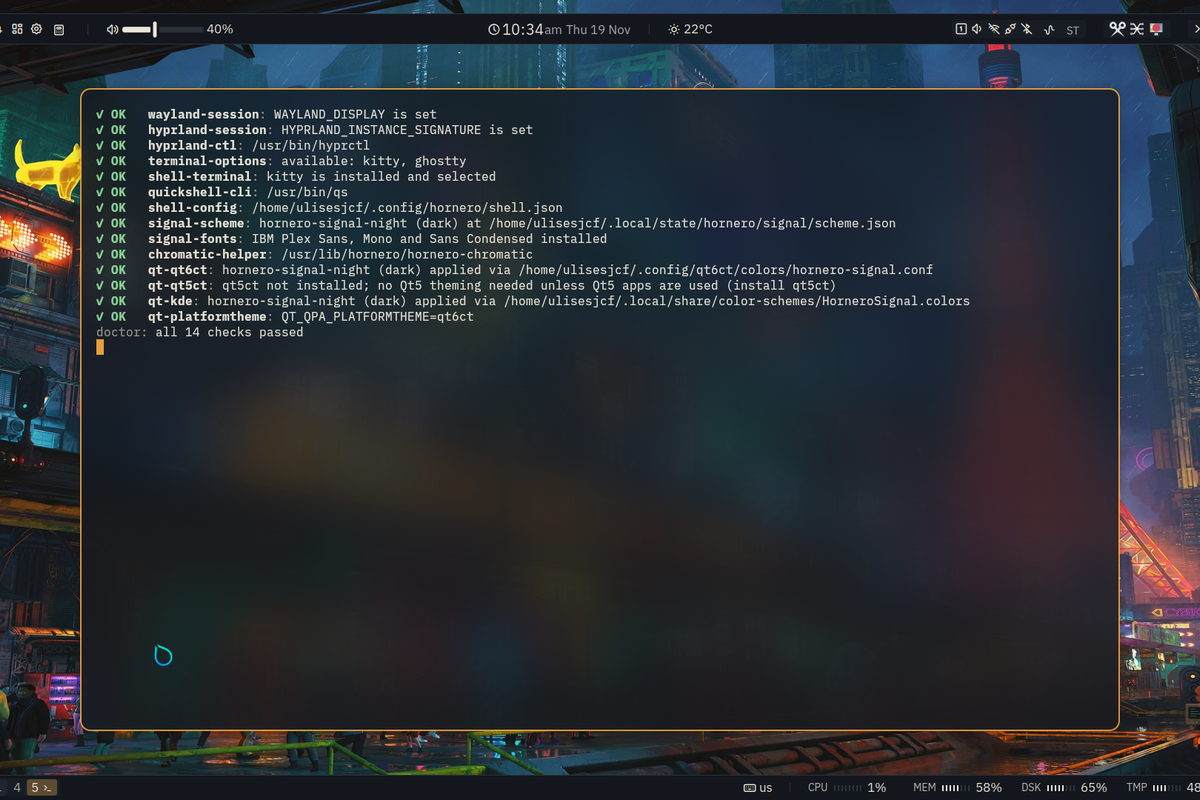
Example doctor output on the maintainer’s machine — the paths
shown are that machine’s home directory; yours will differ. Capture,
19 November 2026.
The machine does not boot
- Boot the fallback kernel from the GRUB advanced options once.
- If neither kernel boots, boot the live ISO and keep the machine unchanged until you have the failing boot’s log.
- Note whether the failure is before the boot menu, at disk unlock, or after login: each is a different owner.
There is no system rollback to reach for; see Updates and recovery for the manual Btrfs procedure and its same-kernel limits.
No network
horneroctl hardware network status
horneroctl doctor
If the adapter itself is missing from the system, collect
lspci -nnk and lsusb and the kernel log lines for it. A missing
adapter is below the desktop layer. See
Network and Bluetooth.
No audio
horneroctl studio doctor
horneroctl studio selection show
systemctl --user status pipewire wireplumber
Confirm the right output device in Settings → Sound first. If you enabled a Studio low-latency drop-in, remove it and restart the user services as in Studio audio before changing anything else.
The shell does not start or a Settings pane is empty
horneroctl shell status --json
horneroctl shell logs --lines 120
horneroctl config validate
Keep the first QML import or load error from the log. Do not repeatedly restart the graphical session, and do not delete user settings to make a pane load. See The shell is missing.
A game does not start
Run horneroctl gaming doctor, then change one launch option at a
time as in
Gaming: Proton, GameMode, Gamescope and MangoHud.
Keep Steam’s Proton log for that game.
Gather logs for a report
journalctl -b -1 --no-pager
journalctl -b -k -p warning --no-pager
horneroctl doctor
-b -1 is the previous boot, the one that failed. Remove
usernames, hostnames, serial numbers, network identifiers and
unrelated personal lines before sharing anything publicly, then
follow how to report a bug.