Hornero Signal
Hornero Signal is the visual language of HorneroOS: one set of colours, type, glyphs and motion shared by the desktop shell, GTK and Qt apps, terminals, the compositor, the lock screen, the login greeter, the installer and the website. It replaces the Material 3–derived appearance the shell inherited from Caelestia.
Development. Hornero Signal is on the
mainbranches of Shell, Config andhorneroctlsince November 2026. current ISOs up to and including v0.2.0-preview32 still ship the previous appearance system. Several shell surfaces (popouts, bars, Control Center pages) are still being redesigned; this page describes only what has landed.
The idea in one paragraph
Think of a contemporary engineering workstation from an alternate 1990s Argentina: broadcast control rooms, oscilloscope bezels, test cards and technical drawing sheets, built with modern restraint. Chrome is quiet and matte so your work stays in front. Colour is used as a signal, not as decoration:
- Amber (
signal) means live, active or primary — the focused workspace, the primary button, a microphone that is on. - Celeste (
cue) means focus, selection or information — the keyboard focus ring and selected items. - Phosphor green (
phosphor) means healthy or connected. - Red (
alert) is reserved for errors and destructive actions.
Text always passes WCAG AA contrast on the surface it sits on, and control outlines pass 3:1. Meaning is never carried by colour alone.
Themes
Every theme provides the same set of named roles, so any theme works everywhere. The catalogue has 20 themes:
- Hornero Signal — Signal Night (factory default), Signal Day and Signal High Contrast.
- Hornero Originals — Buenos Aires Nocturno, Cuyo, Fin del Mundo, Iberá, Iguazú, Pampa, Patagonia, Quebrada and Sierras.
- Community ports — Catppuccin Latte, Catppuccin Mocha, Everforest, Gruvbox, Landscape, Monochrome, Nord Dreams and Rosé Pine.
The three Signal themes and the Originals in more detail:
- Signal Night — cool graphite instrument panels, warm phosphor-cream text, amber signal and celeste cue.
- Signal Day — warm technical-drawing paper with ink-black text.
- Signal High Contrast — pure black ground, white text and outlines, brighter amber and celeste.
- Hornero Originals — regional palettes tinted by a place in Argentina, each paired with a credited photograph of that place.
Choose a theme in Settings → Appearance → Themes, or see Appearance for the terminal commands.
Wallpapers change colours only when you choose Chromatic
A theme decides every colour. With a curated theme (Signal Night, Signal Day, Signal High Contrast or a catalogue theme), changing the wallpaper never changes the palette: the shell, apps and terminals keep the theme’s colours. The one exception is Cockpit Clear, whose bar text switches between the theme’s own night and day inks to stay readable over the new image. See Wallpapers.
Hornero Chromatic is an optional dynamic theme that builds a complete Signal palette from your wallpaper, an image or a colour you pick, with variants such as balanced, vibrant, muted or neon. It keeps the Signal structure and its readability rules. In the shell, the High Contrast switch always overrides it; apps and terminals keep the Chromatic palette. It is specified in RFC 0002 and is not released yet.
Type and glyphs
| Use | Typeface |
|---|---|
| Interface text | IBM Plex Sans |
| Numbers, readouts, labels, code and terminals | IBM Plex Mono |
| Clock, lock screen and large headings | IBM Plex Sans Condensed |
The fonts come from the Arch ttf-ibm-plex package (SIL Open Font
License), which hornero-config installs. Numbers use tabular figures so
values do not jump as they change. Small uppercase labels in Plex Mono —
such as 01 · AUDIO — mark sections.
Shell icons are Hornero Glyphs, a curated set of outline icons derived from Tabler Icons (MIT) and bundled with the shell. No system icon font is required. Application icons still come from your icon theme (Papirus by default).
Signature details
- An on-air bar, a thin amber line on the edge facing your content, marks the active workspace, tab or rail item instead of a filled pill.
- Segmented meters show volume, brightness, battery and resources as discrete segments with the value printed beside them.
- A small amber registration tick marks the focused panel instead of a glow.
- The 45° La Plata diagonal appears only on brand surfaces — lock, greeter, installer, website and wallpapers — never inside controls.
- Radii are small (3–8 px), borders are hairlines, and there is no glass blur behind surfaces by default.
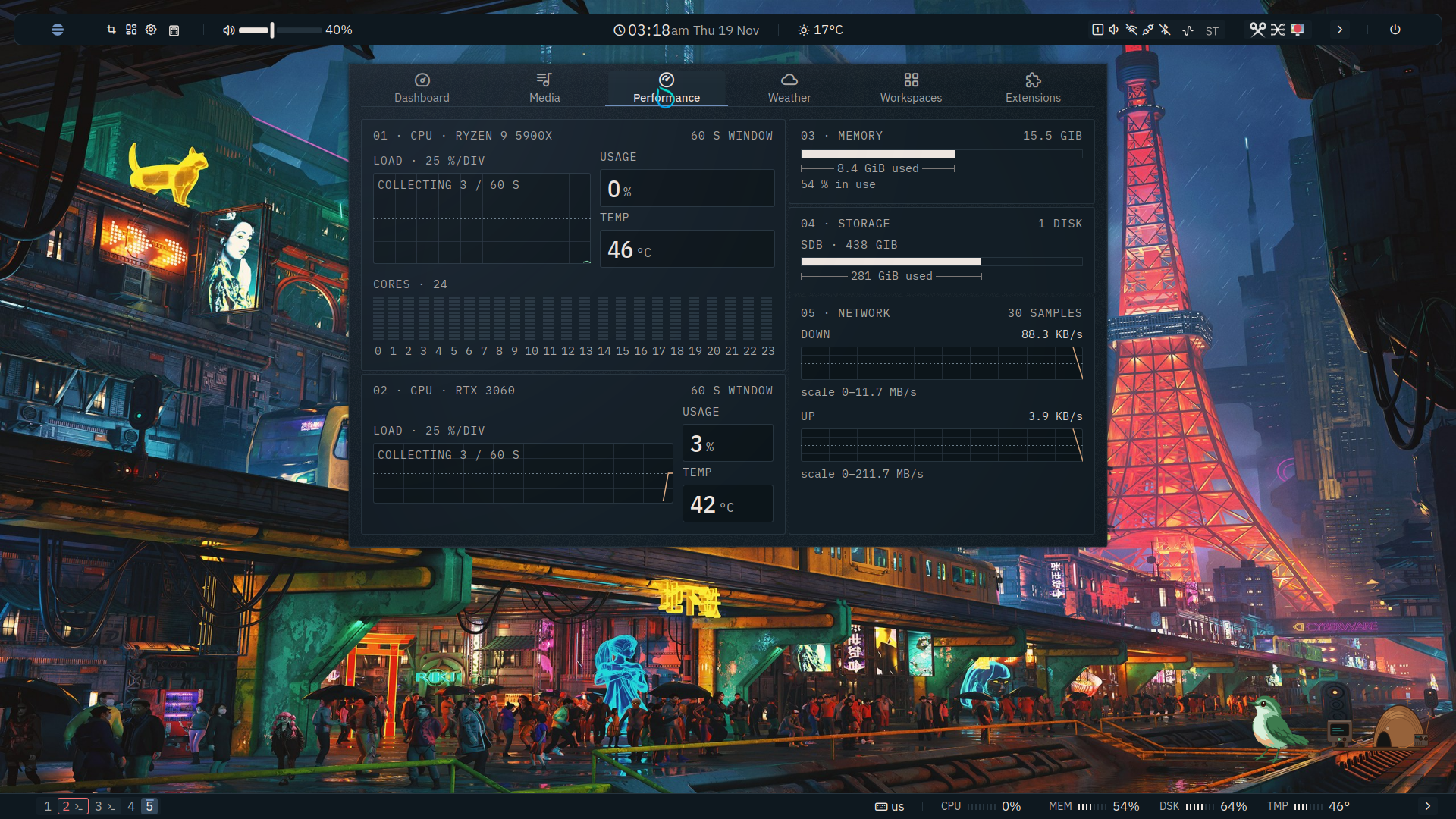
Signal instruments on the desktop: segmented meters with the value printed beside each one. The readings are from the maintainer’s machine, captured 19 November 2026; they are an example, not a requirement.
Accessibility
- High contrast — Settings → Accessibility → High contrast switches
the shell to the Signal High Contrast palette and disables transparency
without changing your selected theme. To use the high-contrast palette
everywhere, including GTK and terminals, apply the
hornero-signal-contrasttheme instead. - Reduced motion — Settings → Accessibility → Reduce motion (also in
Appearance → Animations) removes movement and keeps only short fades.
The shell also follows the desktop-wide GNOME setting
org.gnome.desktop.interface enable-animations. - Text size — Settings → Accessibility → Text size scales shell text.
The same switches are stored as appearance.highContrast and
appearance.reducedMotion in your shell configuration.
Motion
Motion is short and purposeful: things appear from the control that opened them, settle with a very small overshoot, and leave with a quick fade. Nothing blinks or animates while idle. Every surface is usable with animations turned off.
Coming from an earlier preview
The previous themes Hornero Dark, Hornero Light and Hornero 199X are retired. A configuration that still names them is migrated once: Dark and 199X become Signal Night, Light becomes Signal Day. Neon City, Vapor Dreams, Soft Morning and Warm Sunset are also retired and migrate to Signal Night or Signal Day according to their mode. The following were removed with no replacement: wallpaper colour generation, scheme variants (Tonal spot, Vibrant and so on), the accent colour override, Material Symbols and the Rubik typeface. Run this once after updating to migrate and regenerate the derived colour files:
horneroctl appearance sync --dry-run
horneroctl appearance sync --yes
Screenshots and videos published before November 2026 show the previous appearance. On the website they are labelled Preview — previous appearance.
Learn more
- Appearance — choose and apply a theme.
- Wallpapers — set the image behind your windows.
- Appearance architecture — how
themes flow from Config through
horneroctlto the shell and apps. - RFC 0001 — Hornero Signal — the design authority: roles, palettes, type, glyphs, motion and the anchored-surface contract.
- Signal Visual Language — detailed rules for bars, meters, panels, motion and every layout.