 Kitty
 Alacritty
 Ghostty
Appearance: themes and mode
Start in Settings → Appearance when you want a coordinated change. A theme is a complete look: it sets every interface colour and also chooses a default wallpaper, GTK theme, icon theme and light or dark mode. All themes use the Hornero Signal design language.
Development. This page describes Hornero Signal, on the
mainbranches since November 2026. current ISOs up to v0.2.0-preview32 still ship the previous, wallpaper-generated appearance system.
Pick a theme
The catalogue has 20 themes, all complete Signal palettes:
- Hornero Signal — Signal Night (factory default), Signal Day and Signal High Contrast.
- Hornero Originals — Buenos Aires Nocturno, Cuyo, Fin del Mundo, Iberá, Iguazú, Pampa, Patagonia, Quebrada and Sierras: regional palettes, each with a credited photograph.
- Community ports — Catppuccin Latte, Catppuccin Mocha, Everforest, Gruvbox, Landscape, Monochrome, Nord Dreams and Rosé Pine, mapped to the Signal roles.
In Settings → Appearance → Themes, preview a card and select it to apply. If a theme’s GTK or icon theme is missing, the rest of the look still applies; the theme details and the troubleshooting guide show what is missing. Hornero does not silently download third-party themes.
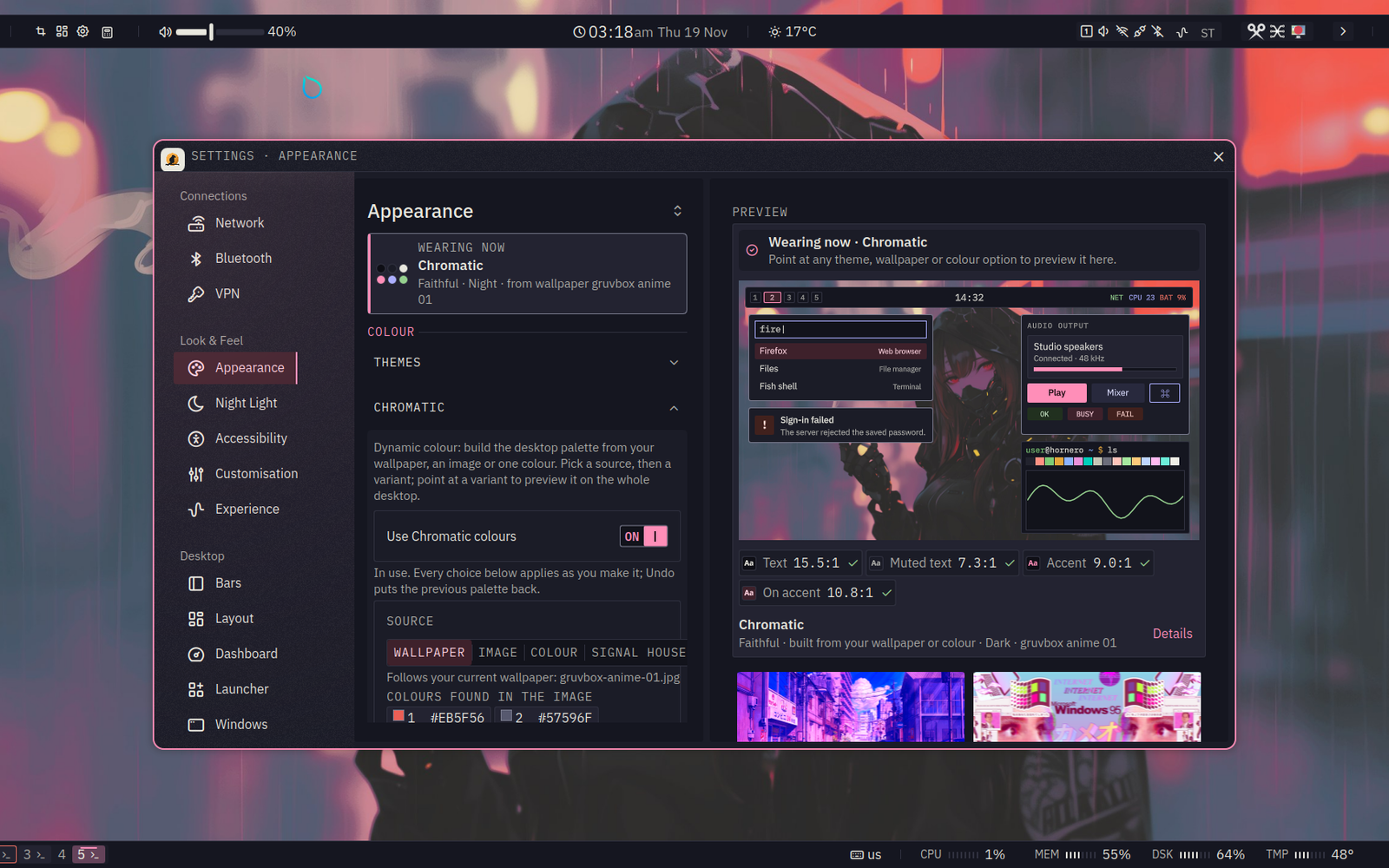
Settings → Appearance. The live preview checks contrast (15.5:1 for text here) before anything is applied. Running-desktop capture from the maintainer’s machine, 19 November 2026.
From a terminal, inspect before applying:
horneroctl appearance theme list
horneroctl appearance theme show patagonia
horneroctl appearance theme apply patagonia --dry-run
horneroctl appearance theme apply patagonia --yes
horneroctl appearance theme get
Use apply for any installed theme. set is the verified switch between
the three built-in Signal themes: it checks that the scheme and GTK agree
afterwards and makes a best-effort rollback to the previous built-in theme
if they do not:
horneroctl appearance theme set hornero-signal-day --dry-run
horneroctl appearance theme set hornero-signal-day --yes
Mutating commands require --yes; --dry-run shows the proposed action.
After a change, horneroctl appearance doctor checks that the live scheme
is valid, that the IBM Plex fonts are installed and that derived files agree.
What applying a theme changes
Applying a theme writes the live colour scheme to
~/.local/state/hornero/signal/scheme.json (under $XDG_STATE_HOME when
set). The shell watches that file and recolours at once. The same apply
step rewrites the Hyprland border and hyprlock colours, switches Kitty’s
theme include, regenerates the Alacritty, Ghostty, btop and Cava palettes,
and applies the theme’s GTK theme. Qt apps follow when qt6ct is the platform
theme.
To see the current state without changing anything:
horneroctl appearance status
horneroctl appearance scheme status
horneroctl appearance colors status
Light and dark
Each theme has a fixed mode: Signal Day, Cuyo, Quebrada, Sierras and Catppuccin Latte are light; the others are dark. To switch between light and dark, choose a theme of the other mode — for the flagship pair, switch between Signal Night and Signal Day.
GTK’s colour-scheme preference is a separate setting that tells GTK and
libadwaita apps which variant to prefer. Inspect or change it with
horneroctl appearance gtk color-scheme; changing it does not change the
shell’s theme.
Accessibility
- High contrast — Settings → Accessibility → High contrast gives the
shell the Signal High Contrast palette and turns off transparency while
keeping your selected theme. Apply
hornero-signal-contrastto use it in GTK, Qt and terminals too. - Reduce motion — in Settings → Accessibility or Appearance →
Animations. The shell also follows the GNOME
enable-animationspreference. - Text size and animation speed — in Settings → Accessibility.
Wallpapers
A wallpaper never changes colours unless you choose to. Each theme names a default wallpaper and collection; you can pick any other image without affecting the palette. To derive the palette from a wallpaper, an image or a colour, use the optional Hornero Chromatic section. See Wallpapers.
Coming from an earlier preview
Hornero Dark, Hornero Light, Hornero 199X, Neon City, Vapor Dreams, Soft Morning and Warm Sunset are retired. A saved selection that names one of them migrates once to Signal Night or Signal Day. The old Material-style wallpaper colour generation was removed; its replacement is Hornero Chromatic, with its own variants. After updating, run:
horneroctl appearance sync --dry-run
horneroctl appearance sync --yes
Theme packs
Theme files and their validation rules live in
HorneroOS/config
(profiles/themes/<id>/theme.json, schema version 2). The catalogue is
generated from those packs. A pack defines every Signal colour role and a
16-colour terminal palette; Config’s checks verify contrast for every
shipped pack, and horneroctl lists and applies only schema-v2 packs.
The architecture guide explains how themes flow from Config through
horneroctl to the shell, GTK, Qt and terminals:
Appearance system. For terminal
details, see Terminal.